Introduction to OMNIXYNC Force Sync and Auto Sync
Force Sync gets the latest orders from all your connected shops. Auto Sync does this for you every few minutes while the page is open, and keeps the stock updated.
How to Use Force Sync and Auto Sync?
Step 1: Navigate to Marketplace > Orders
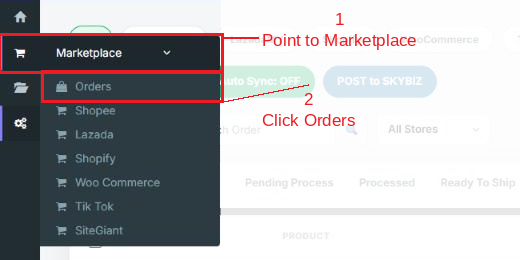
Step 2: Use the buttons on the top right:
- Force Sync = Click it to get the latest orders now.
- Auto Sync = Click it to turn it ON or OFF. When it is ON, orders are synced automatically while this page stays open.

Conclusion
In conclusion, Force Sync and Auto Sync keep your order list up to date, so you always see the newest orders from every shop.
Powered By: SKYBIZ ®