Introduction to OMNIXYNC All Orders
All Orders shows the orders from all your connected shops in one list. You can filter and search the list to find an order quickly.
How to View and Filter Orders?
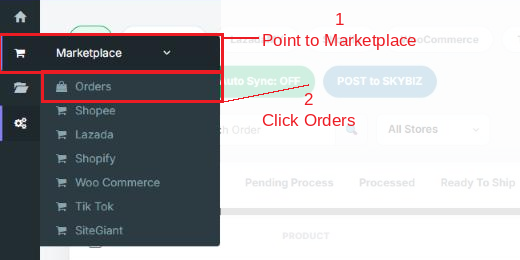
Step 1: Navigate to Marketplace > Orders
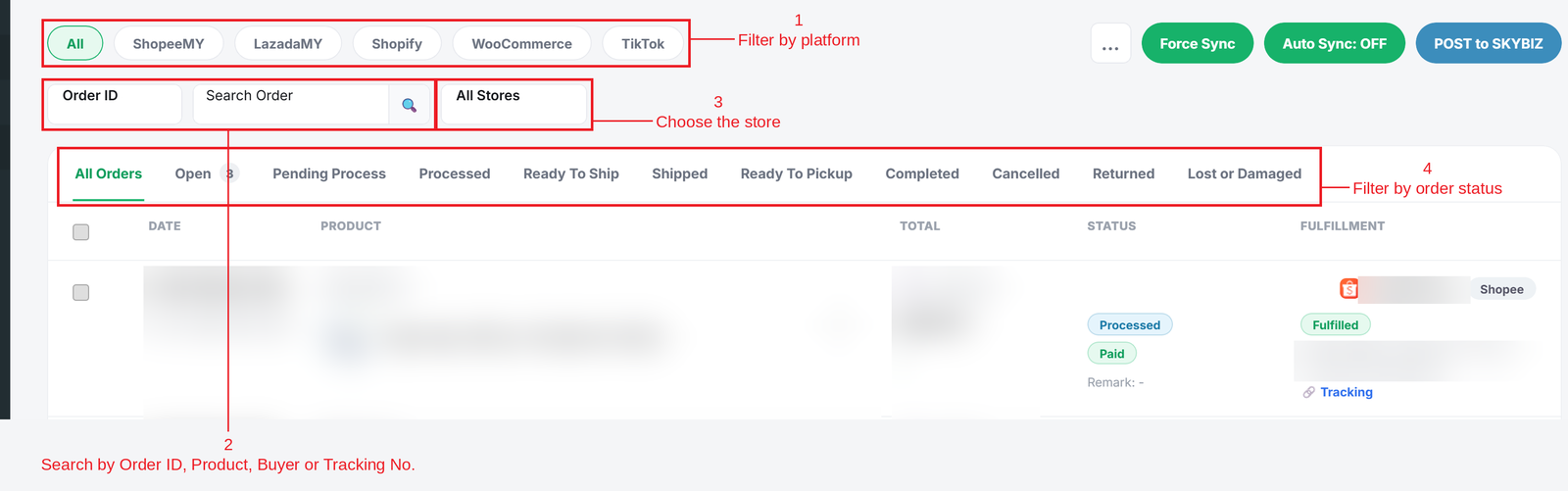
Step 2: Use the tabs and filters to find your orders:
- Platform tabs = Show orders from All, Shopee, Lazada, Shopify, WooCommerce or TikTok.
- Search = Choose Order ID, Product, Buyer or Tracking No., then type and click the search icon.
- Store = Show orders from one shop only.
- Status tabs = Show orders by status, such as Open, Processed, Ready To Ship, Shipped, Completed or Cancelled.
Conclusion
In conclusion, All Orders lets you check the orders from every shop in one place, without logging in to each marketplace.
Powered By: SKYBIZ ®