SKYBIZ Cloud ERP Support

  • SKYBIZ Cloud ERP
  • SKYBIZ Cloud Payroll
  • SKYBIZ Offline

Customer Statement

 2026-04-10   0609. Account Receivable Report

Introduction to Customer Statement

A Customer Statement is an essential financial summary designed to provide your clients with a transparent overview of their account activity over a specific period. By consolidating all invoices, payments, and credits into a single, professional document, it allows customers to easily track their purchasing history and verify any outstanding balances at a glance. Typically issued on a regular monthly basis, these statements serve as a proactive communication tool that simplifies account reconciliation, encourages timely payments, and strengthens the professional relationship between your business and its clientele.


Handle The Customer Statement

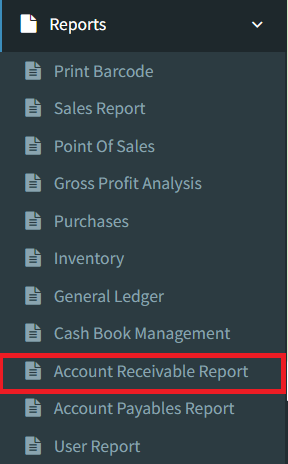
Step 1: To handle the Customer Statement tasks, go to the Reports menu and click on the Account Receivable Report option.
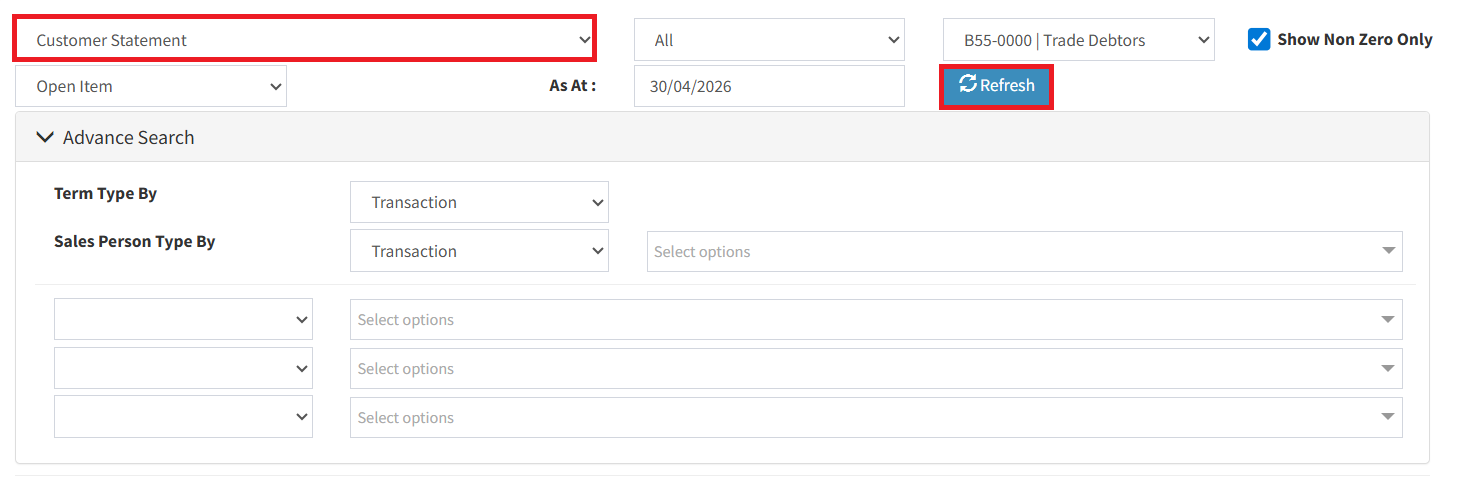
Step 2: Set the report type to Customer Statement and click the Refresh button to load the data.
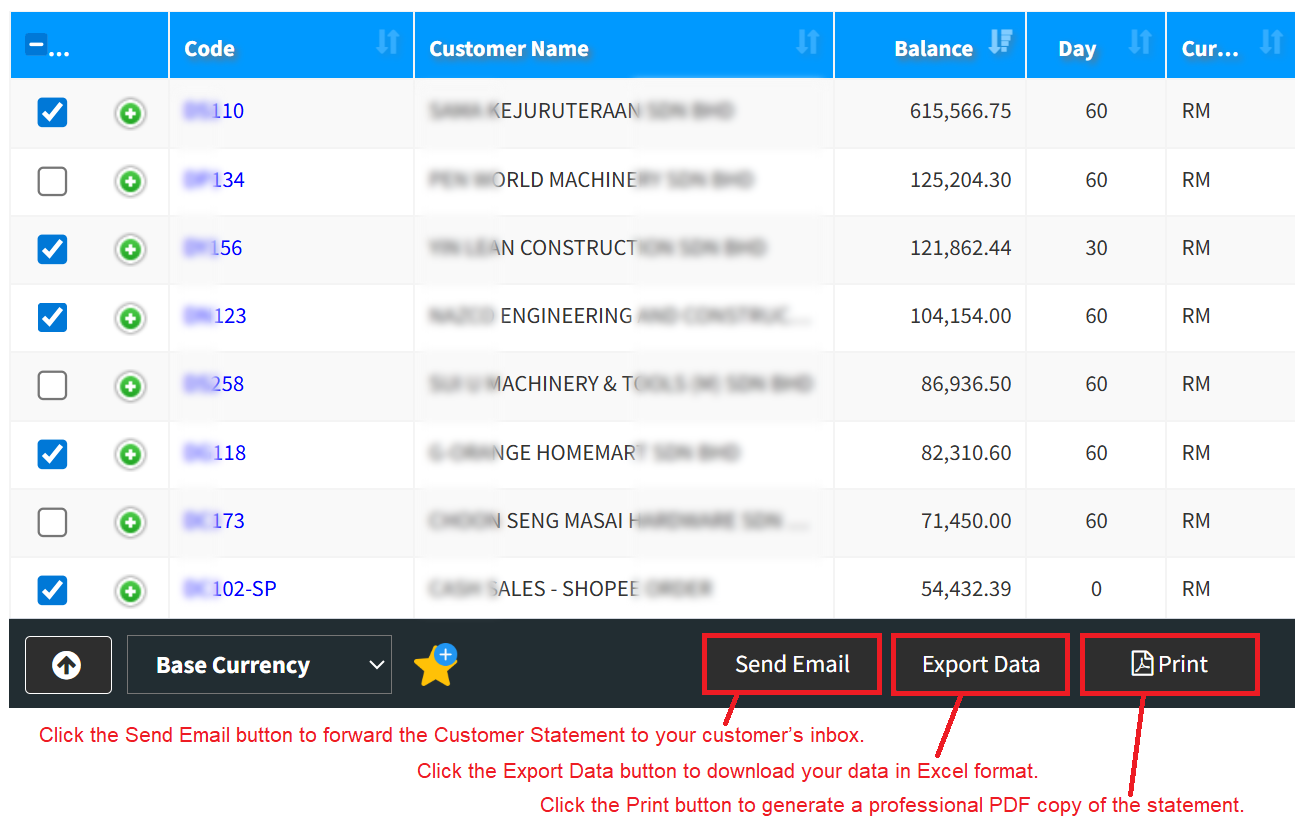
Step 3: Manage Your Statements; Select the specific customer (or choose all) you wish to manage, then select the action button that fits your needs:

  • Send Email: Automatically forward the Customer Statement directly to your customer’s inbox.
  • Export Data: Download the statement details in a professional Excel (.xlsx) format.
  • Print: Generate a high-quality PDF copy of the statement for your records or physical mailing.

Conclusion

In conclusion, the Customer Statement is an indispensable tool for maintaining financial clarity and fostering a transparent professional relationship. By providing a clear, chronological record of all account activity, it empowers your clients to manage their obligations effectively while reducing the need for manual inquiries regarding payment status. Ultimately, implementing a regular statement cycle ensures that your records stay accurate, your collections remain steady, and your customers feel supported by a business that prioritizes organized and honest communication.


Powered By: SKYBIZ ®

<< SKYBIZ Tracking Management System (TMS) Cash Receipt – Generate Credit Note >>

Categories

  • SKYBIZ CLOUDERP (584)
    • 00. E-Invoice (12)
    • 01. Maintenance (43)
      • 0101. Item Group (3)
      • 0102. Unit Of Measurement (3)
      • 0103. Item Maintenance (3)
      • 0104. Item Bundling (3)
      • 0105. Item Bin (1)
      • 0105.Area (1)
      • 0106.Terms (1)
      • 0107.Category (1)
      • 0108.Currency Maintenance (1)
      • 0109.Sales Person (1)
      • 0110.Customer Maintenance (4)
      • 0111.Supplier Maintenance (3)
      • 0112.Price Matrix (1)
      • 0113.Branch (1)
      • 0114.Department (1)
      • 0115.Multi-Level Project (1)
      • 0116.Multi-Level Location (1)
      • 0117.Miscellaneous Maintenance (3)
      • 0123.Voucher (2)
    • 02. Purchase (20)
      • 0201.Internal Purchase Requisition (7)
      • 0202.External Purchase Requisition (6)
      • 0203.Supplier Quotation (5)
      • 0204. Purchase Order (1)
      • 0206.Invoice From Supplier (1)
    • 03. Sales (60)
      • 0301. Quotation (9)
      • 0302. Sales Order (12)
      • 0304. Proforma Invoice (10)
      • 0305. Delivery Order (9)
      • 0307. Sales Invoice (9)
      • 0308. Cash Receipt (3)
      • 0309. Credit Note To Customer (8)
      • 0311. Collection (1)
    • 04. Inventory (9)
      • 0405.Transfer Stock – OUT (2)
      • 0406.Transfer Stock – IN (2)
      • 0407. Stock Adjustment (2)
      • Opening Stock (1)
    • 05. Financial (18)
      • 0502.General Journal (1)
      • 0605. Payment Voucher (2)
    • 07. Reports (17)
      • 0606.General Ledger (1)
        • 0606.General Ledger (1)
      • 0609. Account Receivable Report (3)
      • 0701. Print Barcode (2)
      • 0702. Sales Report (5)
      • 0703. Point Of Sales (4)
      • 0705. Purchases (2)
      • 0706. Inventory (4)
    • 08. Setting (50)
      • 0801. Company Information (2)
      • 0802. Administrator Menu (18)
      • 0803. Security Manager (13)
      • 0804. Database Manager (5)
    • 0902. Multi-Dimensional Analysis (2)
    • 10. API Documentation (10)
      • 1001. Overview (1)
      • 1002. Item (1)
      • 1003. Customer (1)
      • 1004. Price Matrix (1)
      • 1005. Supplier (1)
      • 1006. Sales Order (1)
      • 1007. Sales (1)
      • 1008. Purchase (1)
    • 11. Frequent Q&A (4)
    • 12. Others (375)
      • 02. GL (7)
        • 0201. Chart Of Account (2)
        • 0204. Journal Entry (1)
        • 0206. Bank Reconciliation (4)
      • 03. Account Receivable (3)
        • 0301. Create New Invoice (1)
        • 0301. Official Receipt – Collection From Customer (2)
      • Android T series (17)
      • Android V series (10)
      • Android WMS01 Series (7)
      • Cloud@Backend (10)
      • Cloudbeds (1)
      • CloudPOS (4)
      • Distribution (127)
      • Email (2)
      • Exely (1)
      • Financial (122)
      • General (3)
      • Installation (27)
      • KIV (8)
      • MySQL (4)
      • POS Retail (19)
      • SkyBiz Cloud (17)
      • SkyBiz Payroll (1)
      • Website (2)

.

  • SKYBIZ Cloud ERP
  • SKYBIZ Cloud Payroll
  • SKYBIZ Offline

SkyBiz Product(s)

  • SkyBiz E-Leave|E-Claim|E-Payyroll|E-HR Management|Online Payments for Salary, EPF, SOCSO, LHDN

.

  • SkyBiz Cloud Point Of Sales| Android Point Of Sales |Mobile Point Of Sales

Powered by MyWiki WordPress Theme