SKYBIZ API — Supplier Module
Supplier
The Supplier module allows you to retrieve and create supplier records in your SKYBIZ account. Supports both read and create operations.
Endpoint: /apiv2/modules/supplier.php
Required Permissions: Supplier — Read, Supplier — Create
Read Suppliers
Retrieves suppliers modified within the given date range, ordered by CusCode.
Base Request Structure
{
  "api_key": "your-api-key",
  "api_secret": "your-api-secret",
  "action": "read",
  "date_from": "YYYY-MM-DD",
  "date_to": "YYYY-MM-DD",
  "fields": [],
  "filters": {}
}
Request Parameters
| Parameter | Description | Required |
|---|---|---|
api_key |
Your API key | Yes |
api_secret |
Your API secret | Yes |
action |
Must be "read" |
Yes |
date_from |
Start date (YYYY-MM-DD) | Yes |
date_to |
End date (YYYY-MM-DD). Max 31 days range. | Yes |
fields |
Array of specific fields to return. Empty [] returns all. |
No |
filters |
Object to filter results (e.g., {"Town": "Shah Alam"}) |
No |
Date Rules
- Format must be
YYYY-MM-DD— e.g."2026-04-01" - Maximum range is 31 days
date_fromcannot be afterdate_to
Available Fields (Read Only)
Use the fields parameter to return only the fields you need. Leave empty to return all fields.
| Field | Type | Description |
|---|---|---|
CusCode |
string | Unique supplier code (identifier) |
CusName |
string | Supplier name |
Address |
string | Full address |
AreaCode |
string | Area code |
CurCode |
string | Currency code (e.g., RM, SGD, USD) |
Tel |
string | Primary telephone |
Tel2 |
string | Secondary telephone |
Fax |
string | Fax number |
Fax2 |
string | Secondary fax number |
Email |
string | Email address |
Contact |
string | Contact person name |
ContactTel |
string | Contact person telephone |
Town |
string | Town/City |
State |
string | State |
Country |
string | Country |
PostCode |
string | Postal code |
SalesPersonCode |
string | Assigned salesperson code (for purchase contact) |
CreditLimit |
float | Credit limit amount |
TermCode |
integer | Payment term in days |
StatusBadYN |
string | Bad status flag — "0" or "1" |
DateStart |
string | Supplier start date |
DOB |
string | Date of birth (if individual) |
Sex |
string | Gender |
MemberType |
string | Member type |
DateTimeModified |
string | Last modified datetime — used as the date filter |
Example 1 — Get All Suppliers (All Fields)
This request returns all supplier fields for suppliers modified between April 1, 2026 and April 30, 2026.
Request
{
  "api_key": "your-api-key",
  "api_secret": "your-api-secret",
  "action": "read",
  "date_from": "2026-04-01",
  "date_to": "2026-04-30",
  "fields": [],
  "filters": {}
}
Sample Code for making an API READ request using php
<?php
header('Content-Type: application/json');

// ============================================================
// STEP 1: CONFIGURATION
// ============================================================

$API_KEY = "your-api-key";
$API_SECRET = "your-api-secret";
$ACTION = "read";

// Date range (required for all endpoints, max 31 days)
$DATE_FROM = "2026-04-01";
$DATE_TO = "2026-04-30";

// ============================================================
// STEP 2: ENDPOINT
// ============================================================

$BASE_URL = "https://domain-name/01/clientportal/apiv2/modules"; //(replace it with your skybiz domain name url)
$ENDPOINT = "supplier.php";

// ============================================================
// STEP 3: REQUEST PARAMETERS
// ============================================================

$requestParams = [
    "date_from" => $DATE_FROM,
    "date_to" => $DATE_TO,
    "fields" => [], // Leave empty for all fields
    "filters" => [] // Optional filters
];

// ============================================================
// STEP 4: BUILD PAYLOAD
// ============================================================

$payload = array_merge(
    [
        "api_key" => $API_KEY,
        "api_secret" => $API_SECRET,
        "action" => $ACTION
    ],
    $requestParams
);

// ============================================================
// STEP 5: SEND REQUEST
// ============================================================

$url = rtrim($BASE_URL, '/') . '/' . ltrim($ENDPOINT, '/');

$ch = curl_init($url);

curl_setopt_array($ch, [
    CURLOPT_RETURNTRANSFER => true,
    CURLOPT_POST => true,
    CURLOPT_POSTFIELDS => http_build_query($payload),
    CURLOPT_TIMEOUT => 30,
]);

$response = curl_exec($ch);

// ============================================================
// STEP 6: HANDLE CURL ERROR
// ============================================================

if ($response === false) {
    echo json_encode([
        "status" => "error",
        "timestamp" => date("c"),
        "request_id" => uniqid("req_"),
        "message" => curl_error($ch)
    ], JSON_PRETTY_PRINT);
    curl_close($ch);
    exit;
}

$httpStatus = curl_getinfo($ch, CURLINFO_HTTP_CODE);
curl_close($ch);

// ============================================================
// STEP 7: DECODE RESPONSE
// ============================================================

$result = json_decode($response, true);

if (!$result) {
    echo json_encode([
        "status" => "error",
        "timestamp" => date("c"),
        "request_id" => uniqid("req_"),
        "message" => "Invalid JSON from API",
        "raw_response" => $response
    ], JSON_PRETTY_PRINT);
    exit;
}

// ============================================================
// STEP 8: RETURN CLEAN JSON FORMAT
// ============================================================

echo json_encode([
    "status" => $result['status'] ?? "error",
    "timestamp" => date("c"),
    "request_id" => $result['request_id'] ?? uniqid("req_"),
    "data" => $result['data'] ?? null,
    "message" => $result['message'] ?? null
], JSON_PRETTY_PRINT);
Response (Success)
{
  "status": "response",
  "timestamp": "2026-04-30T04:07:04+00:00",
  "request_id": "req_69f2d56891e57",
  "data": {
    "requested_by": "your-api-key",
    "mode": "2",
    "date_range": {
      "from": "2026-04-01",
      "to": "2026-04-30",
      "days": 30
    },
    "total_returned": 2,
    "data": [
      {
        "CusCode": "SUPP001",
        "CusName": "Global Supplies Sdn Bhd",
        "CurCode": "RM",
        "Tel": "03-12345678",
        "Email": "purchase@globalsupplies.com",
        "Town": "Shah Alam",
        "State": "Selangor",
        "DateTimeModified": "2026-04-15 10:30:00"
      },
      {
        "CusCode": "SUPP002",
        "CusName": "Tech Components Sdn Bhd",
        "CurCode": "RM",
        "Tel": "03-87654321",
        "Email": "order@techcomponents.com",
        "Town": "Kuala Lumpur",
        "State": "Kuala Lumpur",
        "DateTimeModified": "2026-04-20 14:45:00"
      }
    ]
  }
}
Example 2 — Get Specific Fields Only
This request returns only CusCode, CusName, Email, and Tel fields.
Request
{
  "api_key": "your-api-key",
  "api_secret": "your-api-secret",
  "action": "read",
  "date_from": "2026-04-01",
  "date_to": "2026-04-30",
  "fields": ["CusCode", "CusName", "Email", "Tel"],
  "filters": {}
}
Example 3 — With Filters
This request returns only suppliers with TestAPI CusName.
Request
{
  "api_key": "your-api-key",
  "api_secret": "your-api-secret",
  "action": "read",
  "date_from": "2026-04-01",
  "date_to": "2026-04-30",
  "fields": [],
  "filters": {"CusName": "TestAPI"}
}
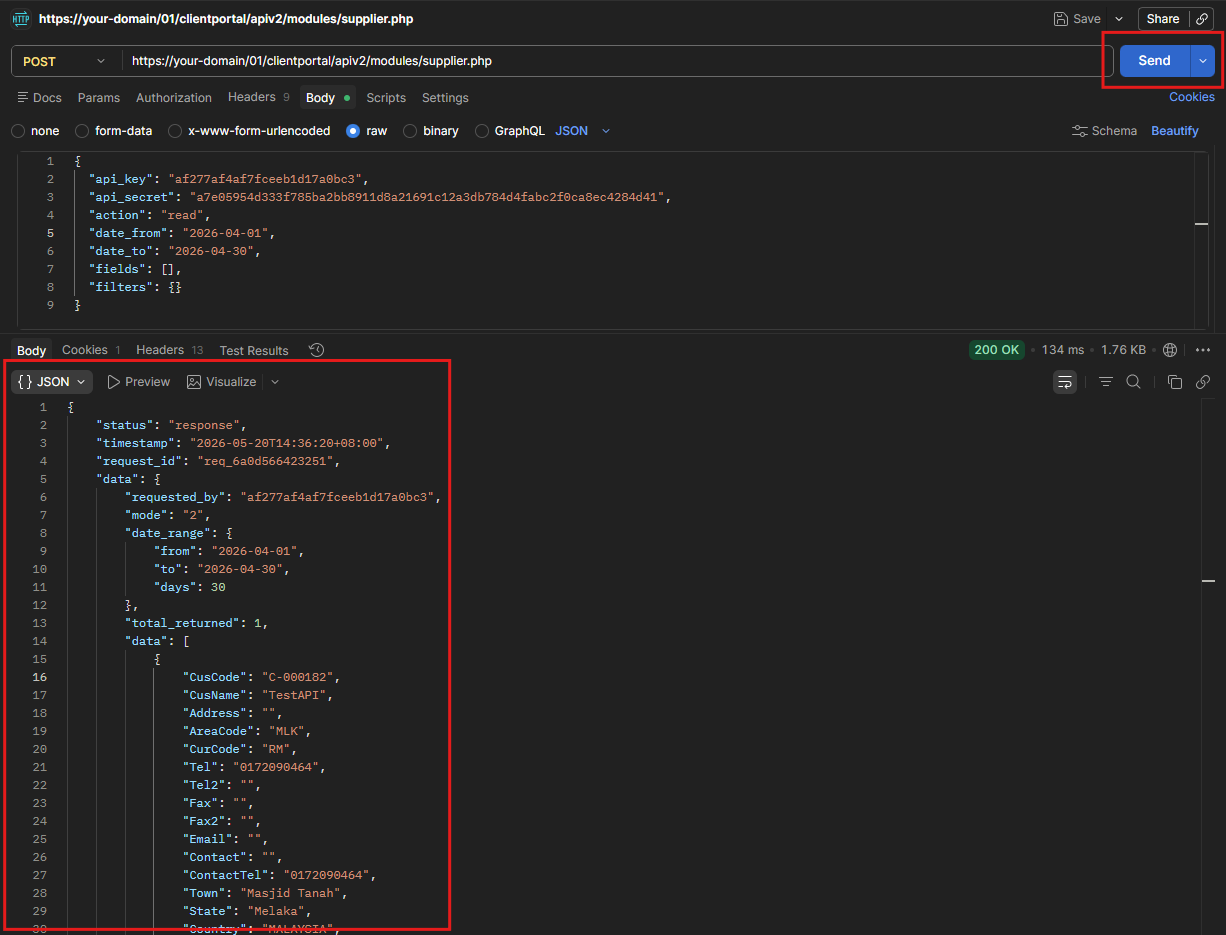
Postman Steps — READ Request
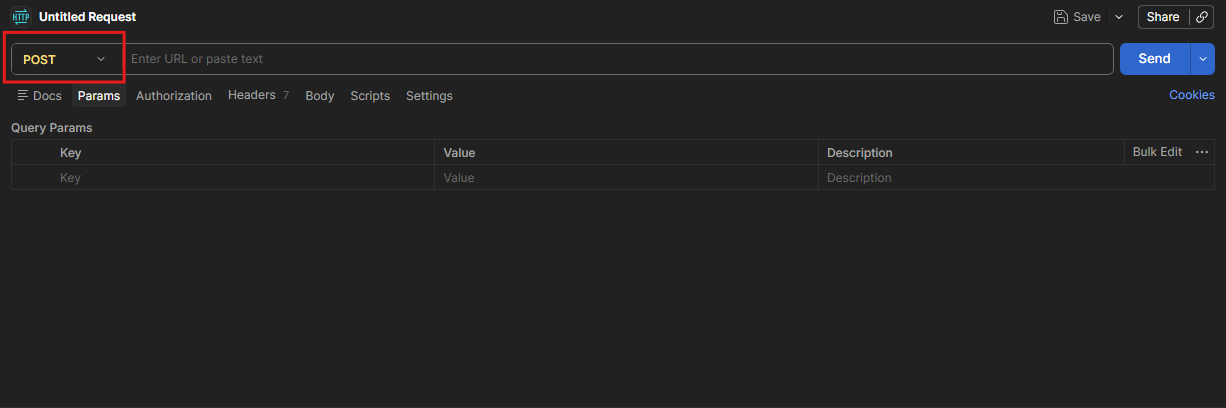
- Set method to POST
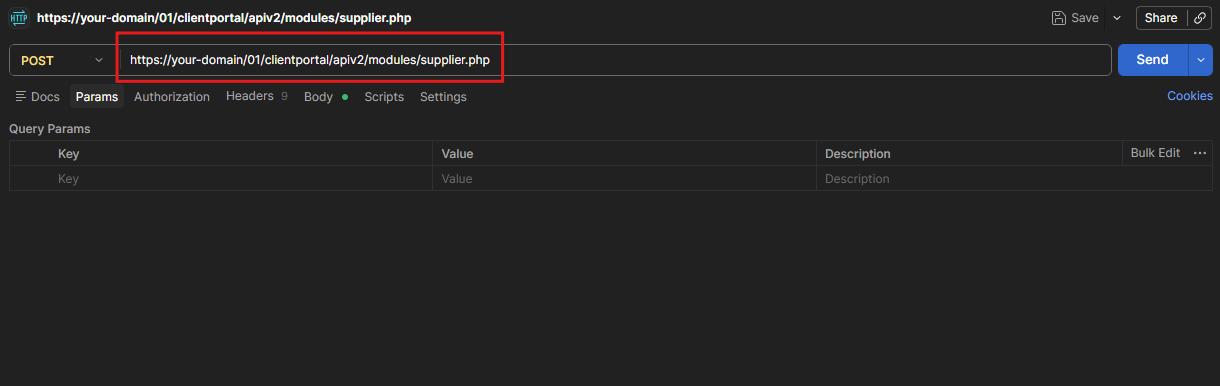
2. Enter URL: https://your-domain/01/clientportal/apiv2/modules/supplier.php
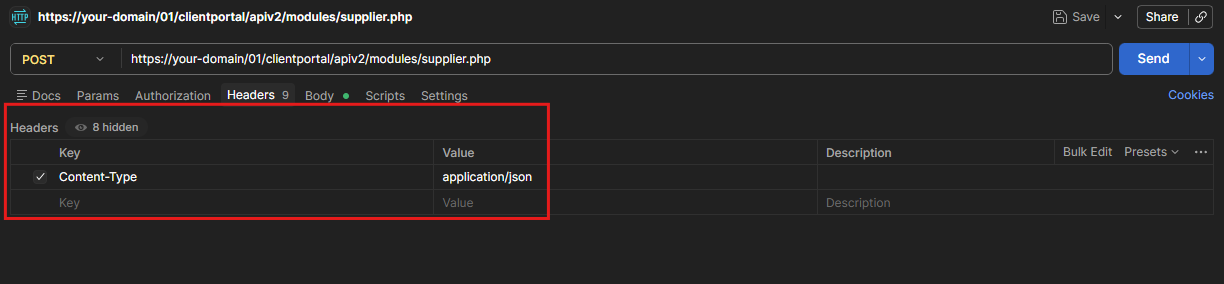
3. Set header: Content-Type: application/json
4. Under Body, select raw and format JSON
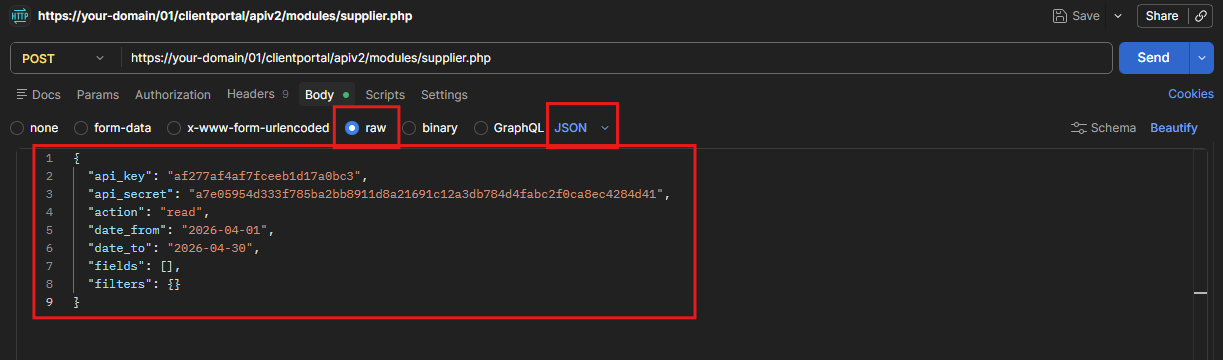
5. Paste your request payload and click Send
Create Supplier
Creates one or more supplier records. All documents are validated before any are saved. If any document fails, the entire batch is rejected.
Note: FinCatCode is automatically set to B70 by the system. Do not include it in your request.
Compulsory Fields
| Field | Type | Description |
|---|---|---|
AccountCode |
string | GL account code (e.g., AP-001) |
CusCode |
string | Unique supplier code. Must not already exist. |
CusName |
string | Supplier name |
CurCode |
string | Currency code. Must exist in SKYBIZ currency table. |
D_ay |
integer | Payment term in days — e.g. 30 |
CategoryCode |
string | Supplier category |
Optional Fields
| Field | Type | Description |
|---|---|---|
Address1 to Address4 |
string | Address lines 1 to 4. Concatenated into Address field. |
AreaCode |
string | Area code |
CreditLimit |
float | Credit limit. Default: 0 |
SalesPersonCode |
string | Assigned purchase contact code |
Tel / Tel2 |
string | Phone numbers |
Fax / Fax2 |
string | Fax numbers |
Contact / ContactTel |
string | Contact person name and phone |
URL / Email |
string | Website URL and email address |
Town / State / Country / PostCode |
string | Address components |
GSTNo |
string | GST registration number |
NRICNo |
string | NRIC number (if individual supplier) |
SalesTaxNo / TaxExemptionNo |
string | Tax-related numbers |
TaxTel / TaxEmail |
string | Tax office contact details |
Base Create Request Structure
{
  "api_key": "your-api-key",
  "api_secret": "your-api-secret",
  "action": "create",
  "supplier_data": {
    "documents": [
      {
        "AccountCode": "AP-001",
        "CusCode": "SUPP001",
        "CusName": "Supplier Name",
        "CurCode": "RM",
        "D_ay": 30,
        "CategoryCode": "LOCAL",
        "Address1": "123 Industrial Area",
        "Address2": "Section 2",
        "AreaCode": "SEL",
        "CreditLimit": 100000.00,
        "SalesPersonCode": "PURCHASE01",
        "Tel": "03-12345678",
        "Email": "supplier@test.com",
        "Town": "Shah Alam",
        "State": "Selangor",
        "Country": "Malaysia",
        "PostCode": "40000"
      }
    ]
  }
}
Sample Code for making an API CREATE request using php
<?php
header('Content-Type: application/json');

// ============================================================
// STEP 1: CONFIGURATION
// ============================================================

$API_KEY = "your-api-key";
$API_SECRET = "your-api-secret";
$ACTION = "create";

// ============================================================
// STEP 2: ENDPOINT
// ============================================================

$BASE_URL = "https://domain-name/01/clientportal/apiv2/modules"; //(replace it with your skybiz domain name url)
$ENDPOINT = "supplier.php";

// ============================================================
// STEP 3: DATA KEY
// ============================================================

$DATA_KEY = "supplier_data";

// ============================================================
// STEP 4: BUILD YOUR DOCUMENTS ARRAY
// ============================================================

$DOCUMENTS = [];

// --- Supplier example ---
$DOCUMENTS[] = [
    "AccountCode" => "AP-001",
    "CusCode" => "SUPP001",
    "CusName" => "Supplier Name",
    "CurCode" => "RM",
    "D_ay" => 30,
    "CategoryCode" => "LOCAL",
    "Address1" => "123 Industrial Area",
    "Address2" => "Section 2",
    "AreaCode" => "SEL",
    "CreditLimit" => 100000.00,
    "SalesPersonCode" => "PURCHASE01",
    "Tel" => "03-12345678",
    "Email" => "supplier@test.com",
    "Town" => "Shah Alam",
    "State" => "Selangor",
    "Country" => "Malaysia",
    "PostCode" => "40000"
];

// ============================================================
// STEP 5: CLIENT-SIDE COUNT CHECK (Please do not modify this)
// ============================================================

$totalDocuments = 0;

foreach ($DOCUMENTS as $document) {
    $totalDocuments++;

    if (empty($document['CusCode'])) {
        echo json_encode([
            "status" => "REJECTED_BY_CLIENT",
            "timestamp" => date("c"),
            "request_id" => uniqid("req_"),
            "message" => "CLIENT-SIDE REJECTION: Document at position {$totalDocuments} has empty CusCode",
            "action_required" => "Fix the document before sending to server"
        ], JSON_PRETTY_PRINT);
        exit;
    }
}

if ($totalDocuments > 500) {
    echo json_encode([
        "status" => "REJECTED_BY_CLIENT",
        "timestamp" => date("c"),
        "request_id" => uniqid("req_"),
        "message" => "CLIENT-SIDE REJECTION: You have {$totalDocuments} documents. Maximum is 500.",
        "your_document_count" => $totalDocuments,
        "max_allowed" => 500,
        "action_required" => "Reduce your documents to 500 or less BEFORE sending to server"
    ], JSON_PRETTY_PRINT);
    exit;
}

echo "=== CLIENT-SIDE VALIDATION ===\n";
echo "Looped through all {$totalDocuments} documents one by one\n";
echo "All documents passed client validation\n";
echo "Document count: {$totalDocuments} (max 500)\n";
echo "Sending to server...\n\n";

// ============================================================
// STEP 6: SEND REQUEST
// ============================================================

$url = rtrim($BASE_URL, '/') . '/' . ltrim($ENDPOINT, '/');

$payload = [
    "api_key" => $API_KEY,
    "api_secret" => $API_SECRET,
    "action" => $ACTION,
    $DATA_KEY => ["documents" => $DOCUMENTS]
];

$ch = curl_init($url);

curl_setopt_array($ch, [
    CURLOPT_RETURNTRANSFER => true,
    CURLOPT_POST => true,
    CURLOPT_POSTFIELDS => json_encode($payload),
    CURLOPT_HTTPHEADER => ['Content-Type: application/json'],
    CURLOPT_TIMEOUT => 120,
]);

$response = curl_exec($ch);

// ============================================================
// STEP 7: HANDLE CURL ERROR
// ============================================================

if ($response === false) {
    echo json_encode([
        "status" => "error",
        "timestamp" => date("c"),
        "request_id" => uniqid("req_"),
        "message" => curl_error($ch)
    ], JSON_PRETTY_PRINT);
    curl_close($ch);
    exit;
}

$httpStatus = curl_getinfo($ch, CURLINFO_HTTP_CODE);
curl_close($ch);

// ============================================================
// STEP 8: DECODE RESPONSE
// ============================================================

$result = json_decode($response, true);

if (!$result) {
    echo json_encode([
        "status" => "error",
        "timestamp" => date("c"),
        "request_id" => uniqid("req_"),
        "message" => "Invalid JSON from API",
        "raw_response" => $response
    ], JSON_PRETTY_PRINT);
    exit;
}

// ============================================================
// STEP 9: RETURN CLEAN JSON FORMAT
// ============================================================

echo "=== SERVER RESPONSE ===\n";
echo json_encode([
    "status" => $result['status'] ?? "error",
    "timestamp" => date("c"),
    "request_id" => $result['request_id'] ?? uniqid("req_"),
    "data" => $result['data'] ?? null,
    "message" => $result['message'] ?? null
], JSON_PRETTY_PRINT);
Response (Success)
{
  "status": "response",
  "timestamp": "2026-05-20T10:30:00+08:00",
  "request_id": "req_69fc0070d83cf",
  "data": {
    "requested_by": "your-api-key",
    "mode": "2",
    "summary": {
      "total_documents": 1,
      "inserted": 1,
      "failed": 0
    },
    "successful_documents": ["SUPP001"],
    "failed_documents": [],
    "fail_details": {
      "compulsory_fields_missing": [],
      "duplicate_suppliers": [],
      "invalid_currencies": [],
      "validation_errors": []
    }
  }
}
Response (Error — Duplicate Supplier)
{
  "status": "response",
  "timestamp": "2026-05-20T10:30:00+08:00",
  "request_id": "req_69fc03e446a20",
  "data": {
    "requested_by": "your-api-key",
    "mode": "2",
    "summary": {
      "total_documents": 1,
      "inserted": 0,
      "failed": 1
    },
    "successful_documents": [],
    "failed_documents": ["SUPP001"],
    "fail_details": {
      "duplicate_suppliers": [
        {
          "cuscode": "SUPP001",
          "error": "Supplier code already exists"
        }
      ]
    }
  }
}
Error Responses
Missing Date Range (READ)
{
  "status": "error",
  "timestamp": "2026-04-07T10:46:15+08:00",
  "request_id": "req_6612f3b9c21a7",
  "message": "date_from and date_to are required"
}
Invalid Date Format
{
  "status": "error",
  "timestamp": "2026-04-07T10:46:15+08:00",
  "request_id": "req_6612f3b9c21a7",
  "message": "Invalid date format. Use YYYY-MM-DD format."
}
Missing Compulsory Fields (CREATE)
{
  "status": "response",
  "timestamp": "2026-05-20T10:30:00+08:00",
  "request_id": "req_123456",
  "data": {
    "summary": {
      "total_documents": 1,
      "inserted": 0,
      "failed": 1
    },
    "failed_documents": ["SUPP001"],
    "fail_details": {
      "compulsory_fields_missing": [
        "Document 1 (CusCode: SUPP001): Missing fields - AccountCode, CusName, CurCode, D_ay, CategoryCode"
      ]
    }
  }
}
Invalid Currency Code (CREATE)
{
  "status": "response",
  "timestamp": "2026-05-20T10:30:00+08:00",
  "request_id": "req_123456",
  "data": {
    "summary": {
      "total_documents": 1,
      "inserted": 0,
      "failed": 1
    },
    "failed_documents": ["SUPP001"],
    "fail_details": {
      "invalid_currencies": [
        "Document 1 (CusCode: SUPP001): Currency code 'INVALID' does not exist"
      ]
    }
  }
}
No Read Permission
{
  "status": "error",
  "timestamp": "2026-04-07T10:46:15+08:00",
  "request_id": "req_6612f3b9c21a7",
  "message": "Supplier read permission denied"
}
No Create Permission
{
  "status": "error",
  "timestamp": "2026-05-20T10:30:00+08:00",
  "request_id": "req_123456",
  "message": "Supplier create permission denied"
}
Common Errors — Supplier Module
| Error Message | Cause | Fix |
|---|---|---|
"date_from and date_to are required" |
Missing date range (READ only) | Add both fields to your request |
"Invalid date format. Use YYYY-MM-DD format." |
Wrong date format | Use YYYY-MM-DD — e.g. "2026-04-01" |
"Date range cannot exceed 31 days." |
Date range too wide | Narrow range to 31 days or fewer |
"Missing fields - AccountCode, CusName, CurCode, D_ay, CategoryCode" |
Compulsory fields not provided (CREATE) | Include all required fields for Supplier module |
"Currency code 'X' does not exist" |
Invalid currency code (CREATE) | Use a valid currency code (e.g., RM, SGD, USD) |
"Supplier code already exists" |
Duplicate CusCode in database (CREATE) |
Use a unique supplier code or update existing record if permitted |
"Duplicate CusCode found in the same batch" |
Same CusCode appears multiple times in one request (CREATE) |
Remove duplicate entries from your documents array |
"Supplier read permission denied" |
No read permission for Supplier module | Enable read permission in portal by contacting your SkyBiz Admin |