SKYBIZ Cloud Payroll Support

  • SKYBIZ Cloud ERP
  • SKYBIZ Cloud Payroll
  • SKYBIZ Offline

Setting certain user(s) to view certain employee information profile and reports

 2019-05-17   0402-1. User Profile Management, SkyBiz e-Leave

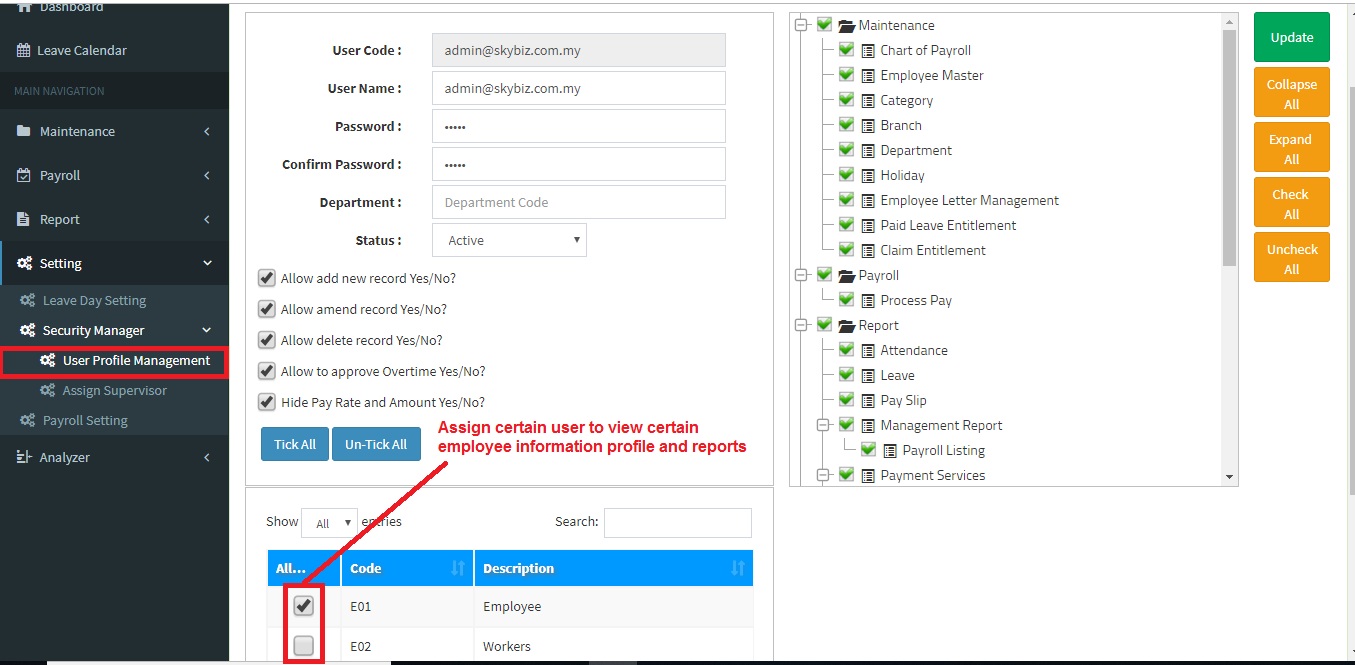
Below are guideline(s) to setting certain user(s) to view certain employee information profile and reports:

  1. Go to “Setting>>Security Manager>>User Profile Management“.
  2. Choose and tick Category code as screen shot.
  3. Click Add New/Update to confirm setting..


Powered By : SKYBIZ ®  Beyond Cloud ™

E-Leave Management System|e-Data PCB


<< Generate Salary file to be attach into CIMB Bank Portal How do I increase salary for confirm employee >>

Categories

  • SKYBIZ CLOUDPAYROLL (43)
    • 01. Maintenance (27)
      • 0101. Chart Of Payroll (4)
      • 0102. Employee Master (6)
      • 0104. Category (4)
      • 0105. Branch (4)
      • 0108. Holiday (3)
      • 0109. Shift Setup (4)
      • 0111. Paid Leave Entitlement (2)
    • 02. Attendance (2)
    • 03. Leave & e-Leave (2)
      • 0301. Leave Application (1)
      • 0302. e-Leave Application (1)
    • 04. Payroll (3)
      • 0206. Normal Pay (1)
      • 0207. Process pay (1)
    • 05. Report (2)
      • 0303. Claim (1)
      • 0306. Statutory Report (1)
    • 06. Setting (5)
      • 0402. Security Manager (4)
        • 0402-2. Assign Supervisor (1)
        • 0402-1. User Profile Management (3)
      • 0401. Leave Day Setting (1)
  • SkyBiz e-Leave (21)
  • Financial (90)
  • SkyBiz Payroll (8)
  • Website (2)

.

  • SkyBiz Accounting
  • SkyBiz Stock Control
  • SkyBiz Web Hosting | SkyBiz Server Hosting

SkyBiz Product(s)

  • SkyBiz E-Leave|E-Claim|E-Payyroll|E-HR Management|Online Payments for Salary, EPF, SOCSO, LHDN

.

  • SkyBiz Cloud Point Of Sales| Android Point Of Sales |Mobile Point Of Sales

Powered by MyWiki WordPress Theme