SKYBIZ Cloud Payroll Support

  • SKYBIZ Cloud ERP
  • SKYBIZ Cloud Payroll
  • SKYBIZ Offline

Create New User ID on Payroll

 2019-03-27   SKYBIZ CLOUDPAYROLL, 0402. Security Manager, 0402-1. User Profile Management, 04. Setting

Below are Guideline(s) to Create New User ID on Payroll


Step 1 : LOGIN SKYBIZ PAYROLL >> go to [ Setting ] >> [ Security Manager ] >> [ User Profile Management ] >>

Step 2 : Fill in New user information & Create Password  >>

Step 3 : Tick which modules/ Rights and Category that allowed user to access >>

Step 4 : On the lower part Tick the [ user ] that you are allowed to view.

Step 5 : Click [ Add New ]
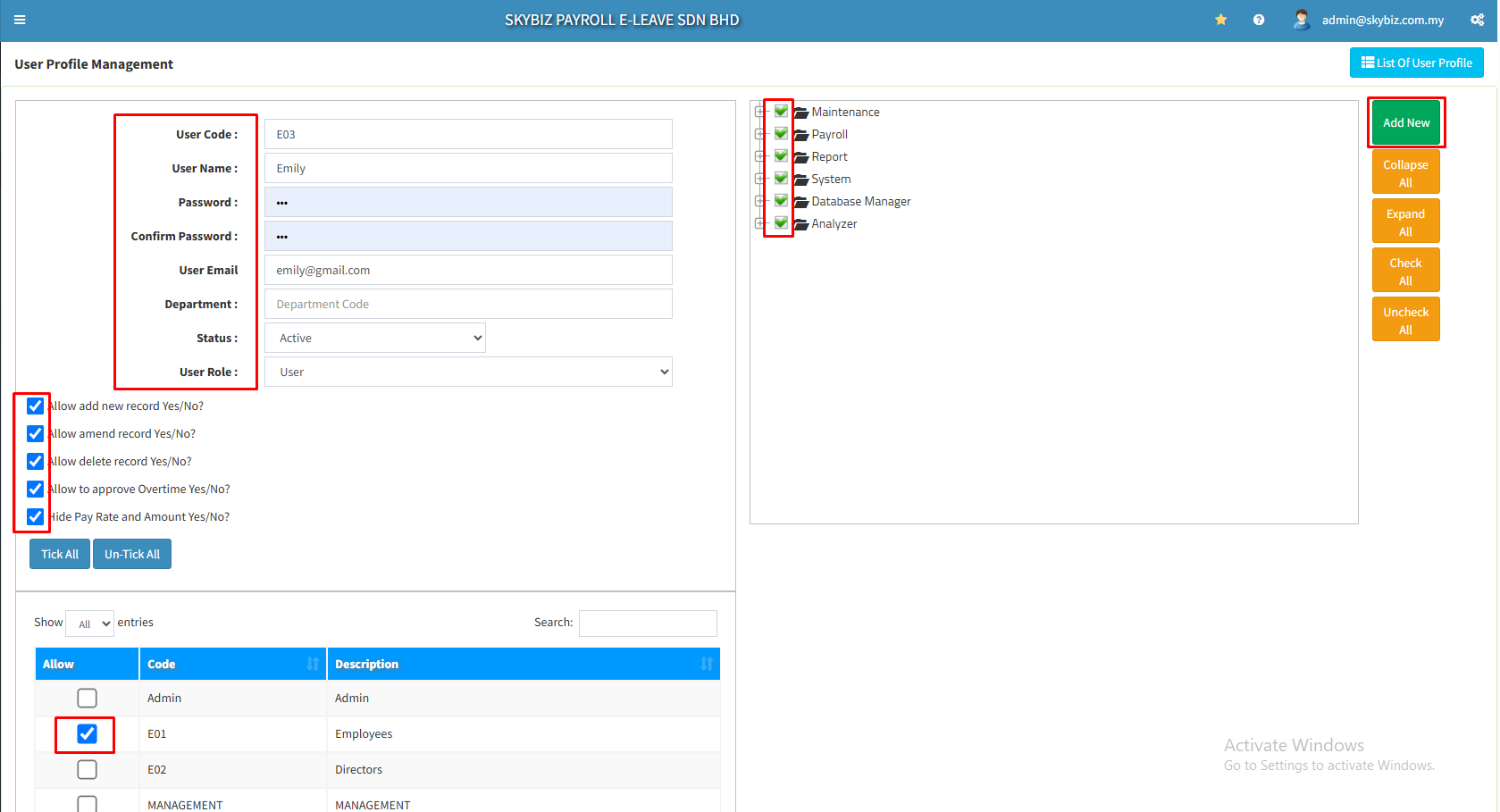
 

Your New User is successfully created.


<< Generate e-Data PCB CP39.txt How do I Create New Template on FingerTec System >>

Categories

  • SKYBIZ CLOUDPAYROLL (24)
    • 05. System (1)
      • 0501. Login (1)
    • 01. Maintenance (11)
      • 0101. Chart Of Payroll (4)
      • 0102. Employee Master (4)
      • 0104. Category (1)
      • 0108. Shift Setup (1)
      • 0110. Paid Leave Entitlement (1)
    • 02. Payroll (3)
      • 0206. Normal Pay (1)
      • 0207. Process pay (1)
    • 03. Report (2)
      • 0303. Claim (1)
      • 0306. Statutory Report (1)
    • 04. Setting (5)
      • 0402. Security Manager (4)
        • 0402-2. Assign Supervisor (1)
        • 0402-1. User Profile Management (3)
      • 0401. Leave Day Setting (1)
  • SkyBiz e-Leave (28)
  • Financial (90)
  • SkyBiz Payroll (8)
  • Website (2)

.

  • SkyBiz Accounting
  • SkyBiz Stock Control
  • SkyBiz Web Hosting | SkyBiz Server Hosting

SkyBiz Product(s)

  • SkyBiz E-Leave|E-Claim|E-Payyroll|E-HR Management|Online Payments for Salary, EPF, SOCSO, LHDN

.

  • SkyBiz Cloud Point Of Sales| Android Point Of Sales |Mobile Point Of Sales

Powered by MyWiki WordPress Theme