Introduction to SKYBIZ Holiday Setup
The Holiday Settings feature in the SKYBIZ Cloud Payroll allows organizations to accurately define and manage public holidays, company-designated holidays, and special non-working days within the payroll system. By configuring holidays in advance, the system can automatically account for non-working days when calculating salaries, overtime, attendance, and leave balances. This setup ensures payroll accuracy, regulatory compliance, and consistent application of company policies across all employees. Properly maintained holiday settings help reduce manual adjustments, minimize payroll errors, and streamline monthly payroll processing.
How to Delete the Holiday?
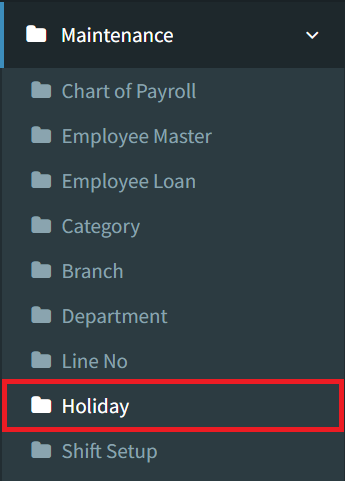
Step 1: To delete the holiday, navigate to Maintenance > Holiday
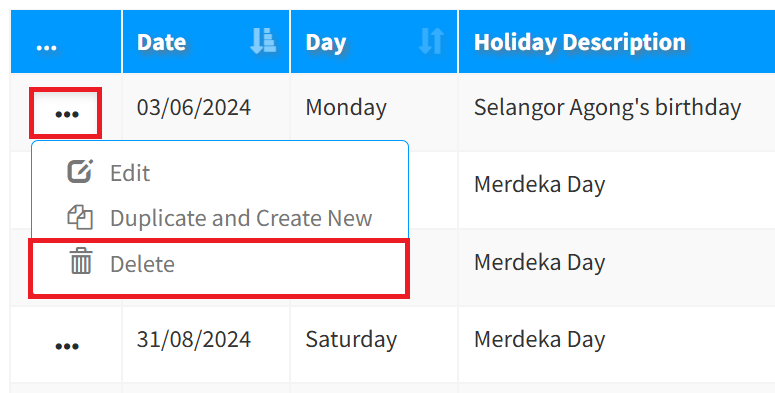
Step 2: Click the 3-dots button, then select Delete to remove the holiday.
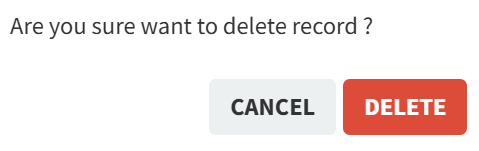
Step 3: Click the Delete button to continue removing the holiday.
Conclusion
By properly configuring the Holiday Settings in the SKYBIZ Cloud Payroll, you ensure that all payroll calculations accurately reflect official non-working days and company-defined holidays. This not only improves payroll accuracy but also reduces manual intervention, prevents discrepancies in salary and overtime calculations, and supports compliance with labor regulations. Maintaining up-to-date holiday records enables smoother payroll processing, consistent attendance tracking, and transparent employee compensation. With the correct holiday setup in place, your organization can operate more efficiently while ensuring employees are paid fairly and on time. This concludes the Holiday Settings tutorial and prepares you to manage payroll with greater confidence and control.
Powered By: SKYBIZ ®