Introduction to OMNIXYNC TikTok Shop Product Listing
The TikTok Shop Product Listing shows all products in your TikTok shop, together with their SKYBIZ stock and link status. You can search and filter the list to find products quickly.
How to View and Filter TikTok Shop Products?
Step 1: Navigate to Marketplace > TikTok Shop
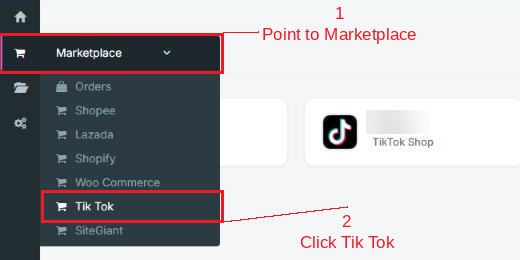
Step 2: Click your shop to open the Product Listing

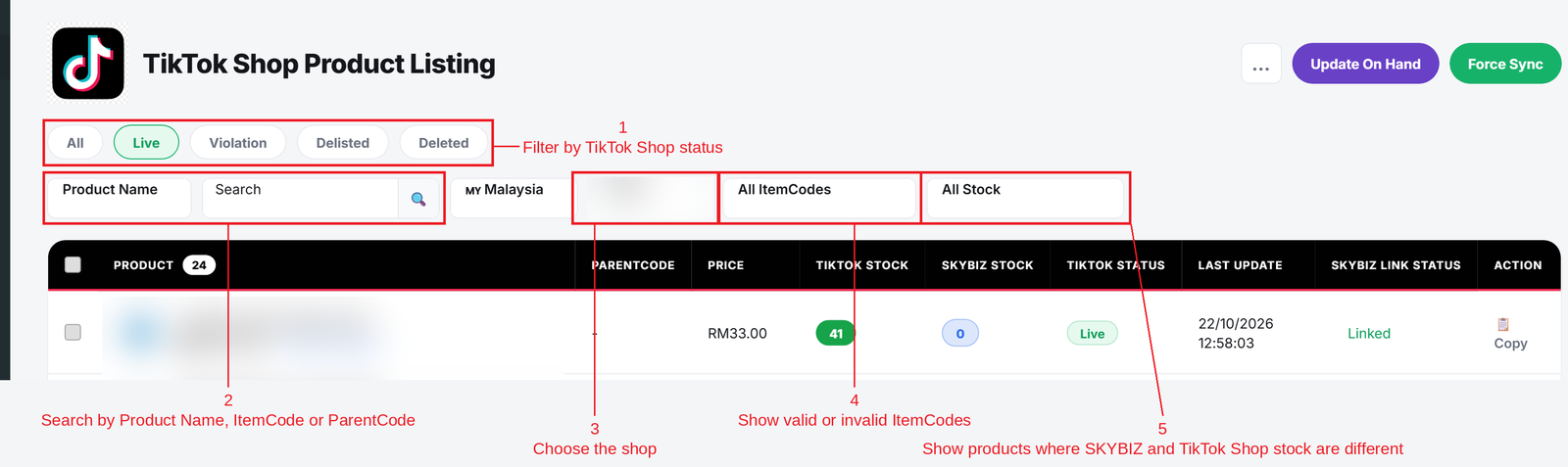
Step 3: Use the tabs and filters to find your products:
- Status tabs = Show All, Live, Violation, Delisted or Deleted products.
- Search = Choose Product Name, ItemCode or ParentCode, then type and click the search icon.
- Shop = Switch to another TikTok shop.
- ItemCodes = Show all, only valid or only invalid ItemCodes.
- Stock = Show products where SKYBIZ and TikTok Shop stock are the same or different.
To see the variants of a product, click + More Variant(s) under the product name.
Conclusion
In conclusion, the TikTok Shop Product Listing gives you one place to check your TikTok Shop products, their stock and their link to SKYBIZ.
Powered By: SKYBIZ ®