Introduction to OMNIXYNC Update On Hand and Force Sync
Update On Hand sends your SKYBIZ stock to Shopify, so Shopify shows the correct quantity. Force Sync gets the latest products from Shopify, so the listing is up to date.
How to Use Update On Hand and Force Sync?
Step 1: Navigate to Marketplace > Shopify
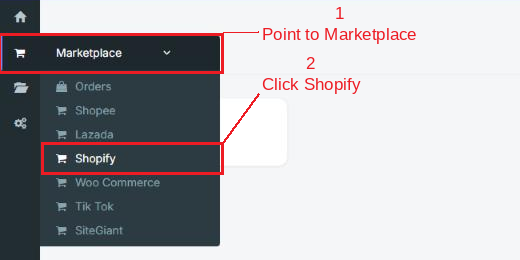
Step 2: Click your shop to open the Product Listing

Step 3: Use the buttons on the top right:
- Update On Hand = Tick the products first, then click it. The SKYBIZ stock of the ticked products is sent to Shopify.
- Force Sync = Click it to get the latest products, prices and stock from Shopify.
A summary is shown under the page title when it is done.

Conclusion
In conclusion, Update On Hand and Force Sync keep your Shopify store and SKYBIZ in line, so buyers see the right stock and you always work with the latest product data.
Powered By: SKYBIZ ®