Introduction to OMNIXYNC Shopee Channel
A Shopee Channel connects your Shopee shop to SKYBIZ. Once connected, you can manage the shop’s products and orders in OMNIXYNC.
How to Connect a New Shopee Channel?
Step 1: Navigate to Marketplace > Shopee
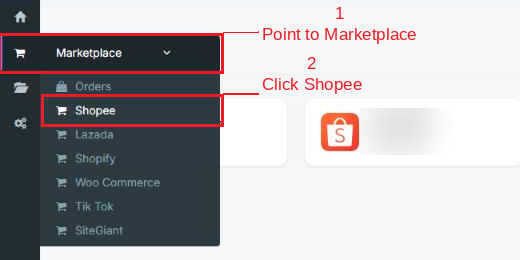
Step 2: Click Add New Sales Channel

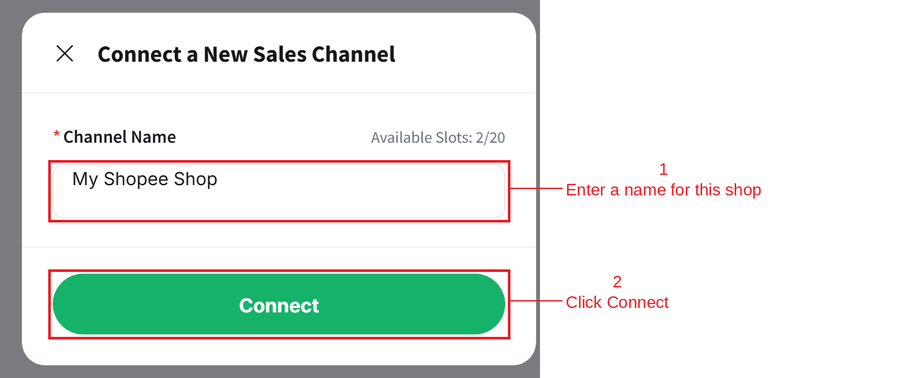
Step 3: Enter a Channel Name for your shop, then click Connect
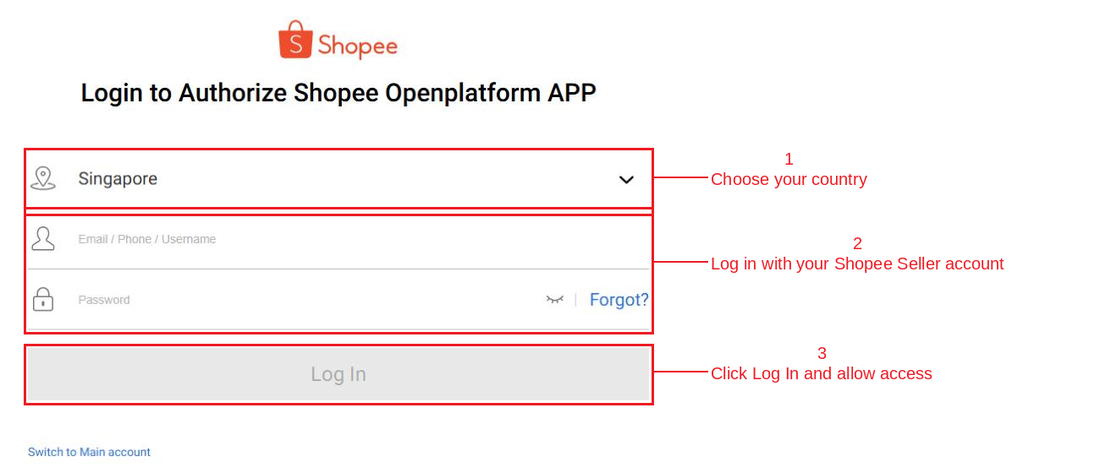
Step 4: Log in with your Shopee Seller account and allow access
Step 5: You will return to the Shopee page, and your new shop will be shown

Conclusion
In conclusion, connecting a Shopee Channel is the first step to managing your Shopee shop in SKYBIZ, so your products, stock and orders can be handled in one place.
Powered By: SKYBIZ ®