Introduction to SKYBIZ Sales Order
A Sales Order is an official document issued by a seller to confirm the details of a customer’s purchase request. It outlines important information such as the products or services ordered, quantities, prices, delivery schedules, payment terms, and other relevant conditions. Once a customer accepts a quotation or places an order, the sales order serves as a formal record authorizing the fulfillment of that order. In accounting, sales orders help track sales commitments, manage inventory levels, and generate invoices accurately. They are essential for ensuring clarity between the seller and the customer throughout the sales process.
How to Delete a Sales Order?
Step 1: To delete a sales order, navigate to Sales > Sales Order
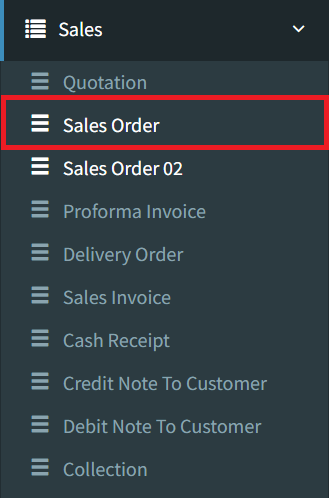
Step 2: Click the Listing button on the bottom right to view all sales orders

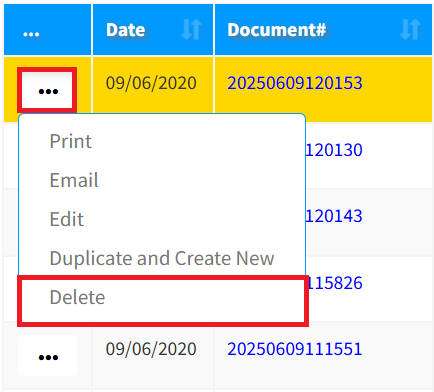
Step 3: Click the 3-Dots icon, then click Delete to remove your sales order
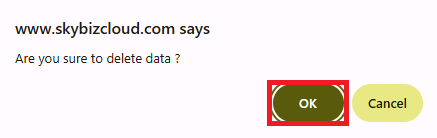
Step 4: Click the OK button to continue removing your sales order
Conclusion
In conclusion, a sales order is a vital document that formalizes a customer’s purchase request and guides the fulfillment process. It ensures that both the seller and the buyer have a clear and mutual understanding of the transaction details, such as product specifications, pricing, and delivery terms. Effective management of sales orders not only streamlines sales and inventory operations but also supports accurate invoicing and financial reporting, contributing to the overall efficiency and reliability of a company’s sales process.
Powered By: SKYBIZ ®