Introduction to OMNIXYNC
OMNIXYNC connects your online shops to SKYBIZ, so you can manage products, stock, orders and returns from all your marketplaces in one place. It saves time and keeps your SKYBIZ and marketplace data the same.
Supported Platforms
- Marketplaces = Shopee, Lazada and TikTok Shop.
- Online stores = Shopify and WooCommerce.
- Order management = SiteGiant.
What You Can Do
- Connect shops = Connect each shop to SKYBIZ as a sales channel.
- Manage products = Copy products between SKYBIZ and your shops, link them, edit them and keep the stock updated.
- Manage orders = See the orders from all shops in one list and post them into SKYBIZ.
- Manage returns = Receive returned parcels and put good items back into SKYBIZ stock.
How to Start?
Step 1: Navigate to Marketplace, then choose your platform
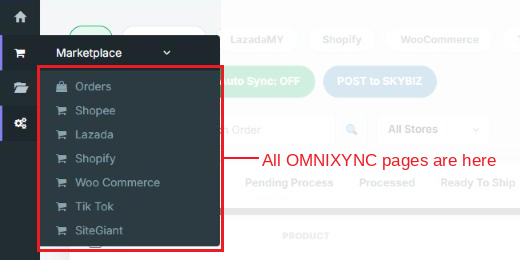
Step 2: Connect your shop with Add New Sales Channel
Step 3: Open your shop to manage its products, then go to Orders to manage your orders
OMNIXYNC Guides
Click a module to see its guides.
| Module | What It Covers |
|---|---|
| 01. Shopee | Connect Shopee shops, manage product listings and edit products. |
| 02. Lazada | Connect Lazada shops, manage product listings and edit products. |
| 03. Shopify | Connect Shopify stores, manage product listings and edit products. |
| 04. WooCommerce | Connect WooCommerce stores, manage product listings and edit products. |
| 05. TikTok Shop | Connect TikTok shops, manage product listings and edit products. |
| 06. SiteGiant | Sync SiteGiant orders and update on-hand stock. |
| 07. Orders | View, sync and post orders from all shops, and manage each order. |
| 08. Manage Order Return | Track returns and failed deliveries, and restock good items. |
Conclusion
In conclusion, OMNIXYNC brings all your online shops into SKYBIZ, so you can sell on more channels with less manual work.
Powered By: SKYBIZ ®