Introduction to SKYBIZ Item Group
An Item Group (also known as an item category) refers to a group of related products that share common characteristics, uses, or market segments. These categories help businesses organize their offerings, manage inventory, and understand customer needs. For example, in a retail setting, product categories might include electronics, clothing, or home appliances. Each category may have several subcategories—for instance, “electronics” might include smartphones, laptops, and televisions. Classifying items into specific categories improves marketing strategies, pricing decisions, and overall product management.
How to Delete an Item Group?
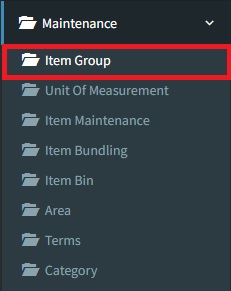
Step 1: To delete an Item Group, navigate to Maintenance > Item Group
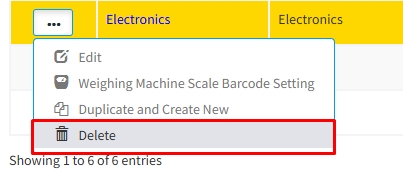
Step 2: Click the 3-Dots icon, then click Delete to remove your Item Group
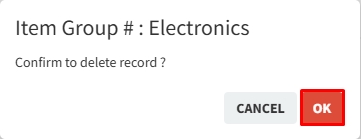
Step 3: Click the OK button to continue removing your Item Group
Conclusion
In conclusion, item groups play a vital role in organizing, marketing, and managing a company’s offerings. By grouping similar products based on function, customer needs, or industry standards, businesses can streamline operations, enhance customer experience, and make more informed decisions. A well-defined product category structure not only simplifies inventory and sales tracking but also supports strategic planning, product development, and targeted marketing efforts. Understanding and utilizing product categories effectively is essential for any business aiming to succeed in a competitive market.
Powered By: SKYBIZ ®