Basically a payment voucher entry is prepared when a form pays money in cash or cheque, demand draf, or any other means to a supplier, customer or to any other source.
It can be used as a proof of payment made from an account.
Below are guideline(s) to Create, Edit and Delete Payment Voucher :
Step 1: Go Financial menu >>> Payment Voucher
a.Select bank account, bank account can be cash or bank.
b.Enter your payment voucher date.
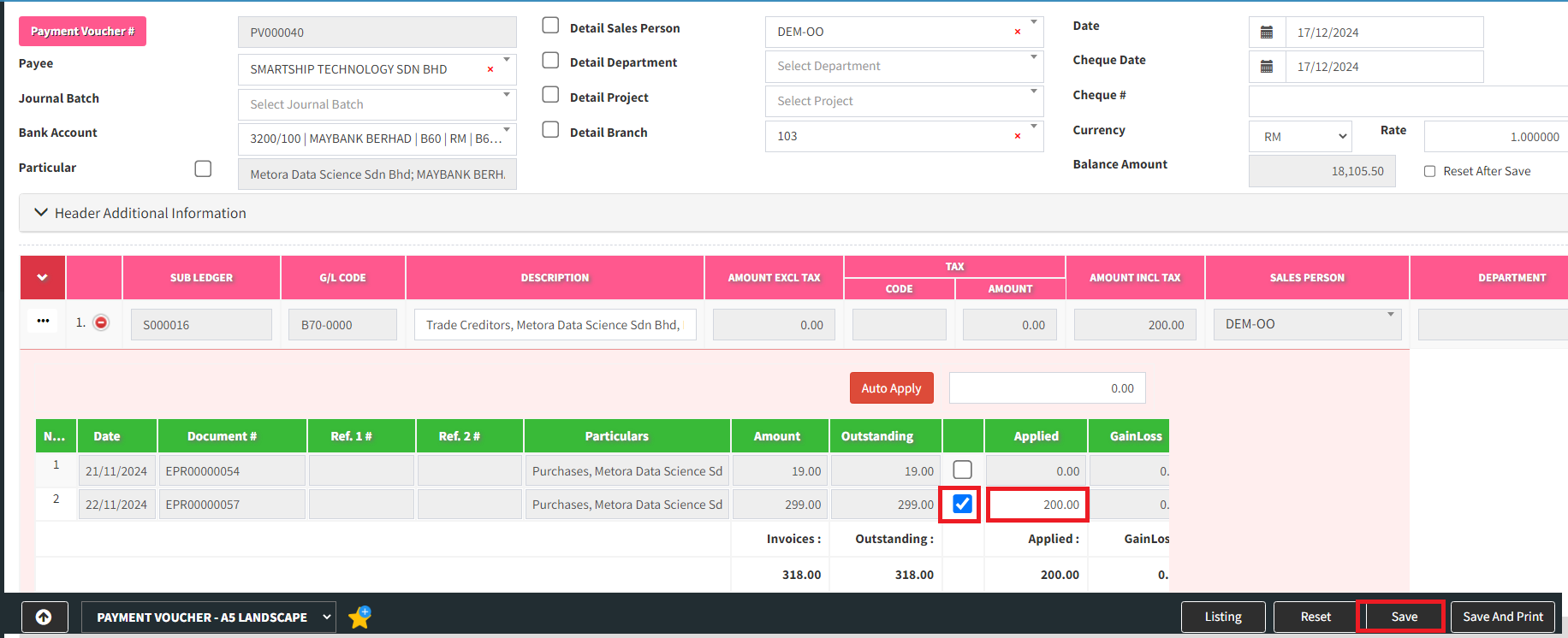
c.Type supplier name or supplier code in the sub-ledger column, Click an icon plus to check outstanding supplier bill.

Step 2 : Tick the bill that you would like to pay and type an amount if you would like to pay partial payment.
For this example, i will make partical payment of 200. Click “Save” to record this payment. voucher
If you want to Edit or Delete the payment voucher, click 3 dots menu on the left, select “Edit” or “Delete” ,then click “OK“
