Below are guideline(s) to entry balance forward of paid leave entitlement:
- Click “Maintenance>>Paid Leave Entitlement>>Generate Paid Leave Entitlement – Manual Adjustment“.
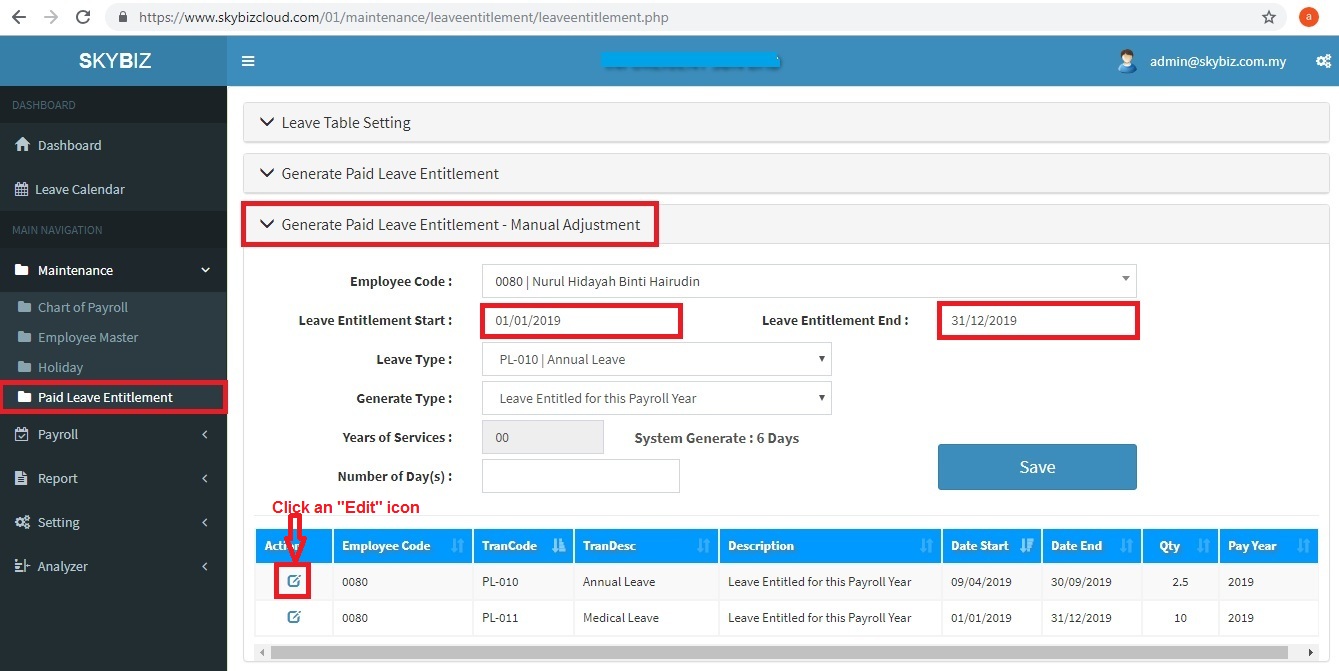
- Choose Employee Code
- Choose Leave Entitlement Start, Leave Entitlement End (Some company follow calendar year thus you may choose 01/01/2019 – 31/12/2019, some company has contract worker thus leave entitlement may start in the middle of year or may ended in the middle of year).
- Choose Leave Type (Example : Annual Leave, Medical Leave).
- Choose Generate Type (Leave Brought Forward From Last Payroll Year, Leave Entitled for Payroll Year).
- Key Number of Day(s) entitled.
- Click “Save” to confirm your settings.
- In case you had keyed wrongly, click an “Edit” icon to amend data.
Powered By : SKYBIZ ® Beyond Cloud ™