Introduction to SKYBIZ Credit Note to Customer
A Credit Note is a formal document issued by a seller to a customer, serving as a powerful tool for maintaining financial accuracy and trust. It acts as a “reverse invoice,” acknowledging that a specific amount is being credited back to the customer’s account, whether due to returned merchandise, pricing errors, or damaged goods. By providing a clear record of these adjustments, a Credit Note ensures that both your internal accounting and the customer’s records remain perfectly synchronized, reflecting a commitment to transparency and professional service.
How to Bulk Email a Credit Note to Customer?
Step 1: To bulk email a Credit Note to Customer, navigate to the Sales menu and select the Credit Note to Customer option.
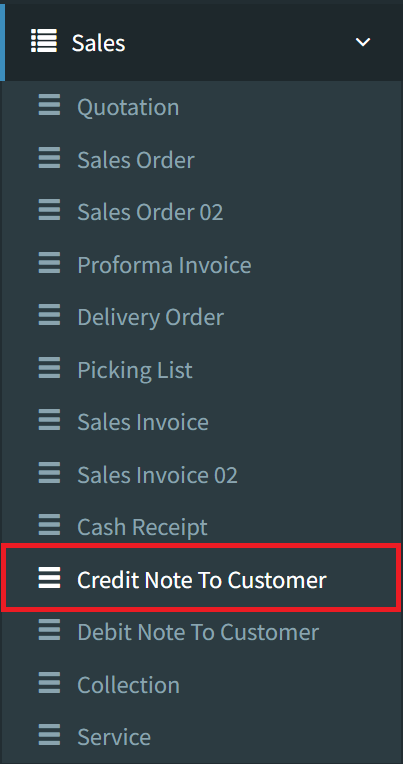
Step 2: Select the Listing button located in the bottom-right corner to view a comprehensive list of all existing Credit Notes to Customer.

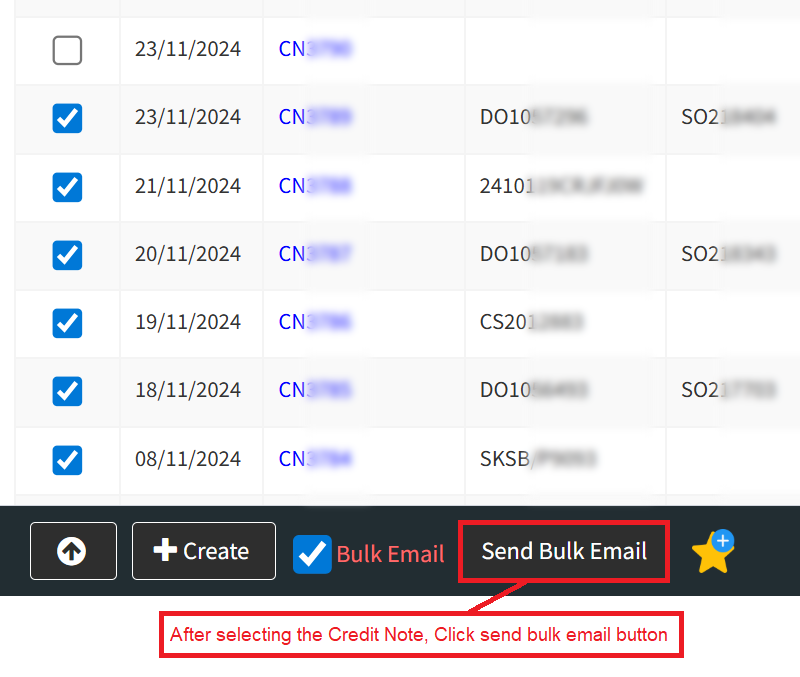
Step 4: Tick the Bulk Email checkbox, then select the specific Credit Note documents you want to send in bulk.

Step 4: Please select the Credit Note to Customer you would like to send by ticking the associated boxes. Once your selection is complete, click the Send Bulk Email button to finalize the batch.
Conclusion
Ultimately, providing a Credit Note is more than just a financial adjustment; it is a vital practice for maintaining healthy client relationships and bulletproof accounting. By formally documenting refunds and returns, you provide your customers with peace of mind while ensuring your business records accurately reflect your true revenue and inventory levels. Implementing a clear, professional credit process safeguards your professional reputation and fosters long-term customer loyalty through transparency and fairness.
Powered By: SKYBIZ ®