For standard guidance to setup the SKYBIZ API, you can refer: SKYBIZ API Setup – Standard
Introduction to SKYBIZ API Setup
The SKYBIZ API is a secure, server-side REST interface that enables third-party applications, integration partners, and internal development teams to programmatically access and submit business data stored within the SKYBIZ system. Built on standard HTTP with JSON-formatted responses, the API provides structured, real-time access to five core business modules — Customer, Supplier, Item, Sales, and Purchase — allowing external systems to read and create SKYBIZ data without manual exports, file transfers, or direct database access.
Every request is authenticated using a unique API Key and Secret pair generated and managed through the SKYBIZ portal. The Secret is hashed at rest using bcrypt and is never returned in any API response after initial registration, meaning credentials are protected even if a response is intercepted.
Access is further controlled through a per-module permission system, where each credential set carries individually configured read and create permissions. The API enforces HTTPS in Production mode, applies a two-tier rate limit at both IP and API Key level to prevent abuse, and maintains a full audit log of every authenticated request. All of this is reviewable from the SKYBIZ portal under Active API Sessions.
API Integration operates in one of three configurable modes — Disabled, Production, and Developer — each with different access controls suited to different stages of development and deployment. The API is designed for developers experienced with REST interfaces and JSON, and is intended to serve as a reliable, secure, and auditable bridge between SKYBIZ and any external system that needs access to your live business data.

Getting Started
Prerequisites
Before initiating any API interaction, the following conditions must be satisfied:
1. API Integration Mode. API Integration must be set to an active mode by your SKYBIZ administrator via the portal. If API Integration is set to Disabled (Mode 0), all incoming requests — including credential registration — will be automatically rejected. Ensure an active mode is configured prior to proceeding. See Integration Modes for a full description of each mode.

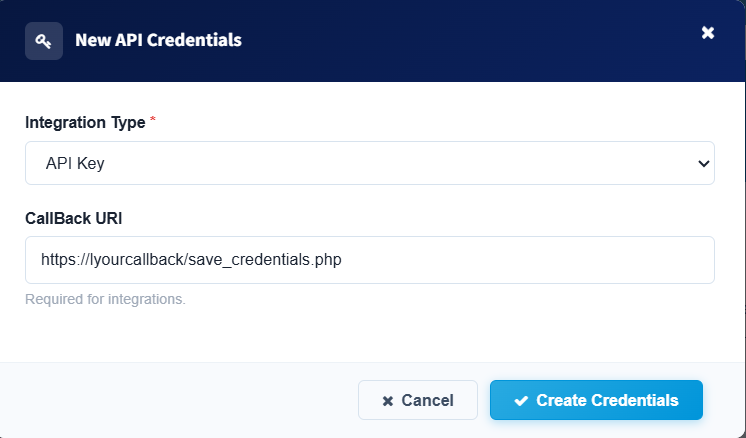
2. Callback URL Availability. A valid and accessible Callback URL is required. The Callback URL must be publicly accessible, fully operational at the time of credential registration, and capable of receiving POST requests. The credential issuance process is dependent on the successful delivery of data to this endpoint.
Integration Mode
The SKYBIZ API operates in one of three modes, controlled by the SKYBIZ administrator. The mode governs security requirements and origin restrictions for all API requests made under that store’s credentials.
| Mode | Name | Behaviour |
|---|---|---|
| 0 | Disabled | All API requests rejected with 403. No data access or registration is possible. |
| 1 | Production | HTTPS is required for all API calls. Any request origin is permitted. |
| 2 | Developer | Localhost origins only (e.g. http://localhost, http://127.0.0.1 and common ports). HTTP is permitted for local testing. |
The active mode is returned in every successful data response as the mode field, so your integration can verify the mode under which a request was processed.
If a request violates the mode’s rules — for example, a plain HTTP request under Production mode — the API returns 403 Forbidden. Contact your SKYBIZ administrator to change the integration mode.
Credential Registration Workflow
The credential registration process consists of the following steps:
Step 1 : Submit a registration request
Initiate the process by sending a POST request to the registration endpoint with the following parameters:
-
-
callback_url— URL publicly accessible HTTPS endpointstore_code— Unique identifier for your storestore_main— Primary store indicator
-
Upon receiving the request, SKYBIZ validates whether API Integration is enabled for the specified store before proceeding.
Step 2 : Credential Generation
If validation is successful, SKYBIZ generates the following credentials:
-
-
- API Key
- 25-character alphanumeric string
- Uniquely identifies your store
- API Secret
- 64-character randomly generated string
- Provided in plain text only at this stage
- API Renewal Date
- An expiry date assigned to the credential at the point of registration. See the API Key Renewal Date section below.
- API Key
-
Step 3 : Callback Invocation
SKYBIZ sends a POST request to your provided Callback URL with the generated credentials.
Request Payload (JSON body):
{
"api_key": "your-generated-api-key",
"api_secret": "your-generated-api-secret"
}
Request headers:
Content-Type: application/json
X-Timestamp: <unix-timestamp>
X-Signature: <HMAC-SHA256 hash>
Step 4 : Signature Verification
Signature verification is mandatory to ensure request authenticity.
The X-Signature is generated using an HMAC-SHA256 hash computed as follows:
signature = HMAC_SHA256(
key = API Secret,
message = timestamp + "." + raw_json_payload
)
On your Callback endpoint:
- Reconstruct the signature using the same algorithm and inputs
- Compare it with the value provided in the
X-Signatureheader
- If the values match → the request is verified and trusted
- If the values do not match → the request must be rejected
Step 5 : Secure Credential Storage.
Upon successful signature verification, immediately store the following credentials securely:
- API Key
- API Secret
Important:
This is the only instance where the API Secret is available in plain text. SKYBIZ does not retain or provide access to the Secret after this step.
Failure to securely store the Secret will require you to:
- Deactivate the current credential set
- Repeat the registration process
Step 6 : Registration Completion
SKYBIZ responds with a 200 OK status upon completion, including a callback_status field indicating whether the Callback delivery was successful.
At this point, the credentials are fully activated and ready for use.

⚠ What if my Callback URL fails?
If your Callback URL is unreachable or returns an error, the credentials are still written to the SKYBIZ system but registration does not roll back. The callback_status in the response will reflect the failure. In this case, deactivate the credential set from the portal and re-register with a working Callback URL. Do not attempt to use credentials that were not successfully delivered to your endpoint.
Authentication
Authentication Method
The SKYBIZ API uses a credentials-in-body authentication model. Every request must include the following two fields in the JSON request body:
api_key— The unique identifier assigned to your store during credential registrationapi_secret— The 64-character secret generated at registration and stored exclusively on your end
Both values must be present in every request. Omitting either field will result in an immediate 400 Bad Request response before any further processing occurs.
How Authentication is Verified Server-Side
Upon receiving a request, the SKYBIZ API performs the following verification sequence:
- The API Key is used to locate the corresponding record in the system
- If no matching record is found, a
401 Unauthorizedresponse is returned immediately - The renewal date on the credential is checked. If
APIRenewalDateis not set, or if today’s date is past the renewal date, a 401 Unauthorized response is returned immediately. - If a matching record is found, the provided API Secret is verified against the stored bcrypt hash using
password_verify() - If the hash comparison fails, a
401 Unauthorizedresponse is returned
Important: Both a missing key and an incorrect secret return the same generic message — "Invalid API credentials" — intentionally. The API does not indicate which of the two values failed, as doing so would provide information useful to an attacker.
The plain-text API Secret is never stored, never logged, and never returned in any API response under any circumstance.
Failed Authentication
| Scenario | HTTP Status | Message |
|---|---|---|
api_key or api_secret missing from request body |
400 | "API key and secret are required" |
| API Key not found in system | 401 | "Invalid API credentials" |
| API Secret does not match stored hash | 401 | "Invalid API credentials" |
APIRenewalDate not set on credential |
401 | "Invalid API credentials: No expiry date set. Please generate new credentials." |
| Credential has passed its renewal date | 401 | "API key expired on YYYY-MM-DD. Please delete the expired credentials and create a new API key set to continue using the API." |
| API Integration disabled for store (Mode 0) | 403 | "API integration is disabled for this account" |
API Key Renewal Date

Every API key issued by SKYBIZ carries a renewal date — a fixed expiry date set at the time of credential registration. Once the renewal date has passed, the key is no longer valid and all requests made using it will be rejected immediately, regardless of whether the key and secret are otherwise correct.
The following conditions trigger a 401 response related to the renewal date:
| Condition | Message |
|---|---|
APIRenewalDate is not set on the credential |
"Invalid API credentials: No expiry date set. Please generate new credentials." |
Today’s date is past the APIRenewalDate |
"API key expired on YYYY-MM-DD. Please delete the expired credentials and create a new API key set to continue using the API." |

The renewal date is visible in the API Credentials section of the SKYBIZ Portal. Monitor this date proactively — there is a warning when a key is expired. When a key expires, the only resolution is to delete the expired credential set from the portal and register a new one. The existing key cannot be extended or reactivated.
Credential Lifecycle

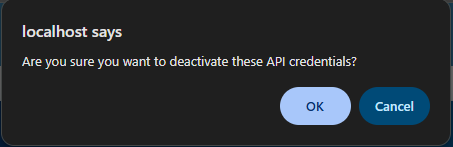
Deactivating Credentials To revoke access, submit a deactivation request to delete section. This nullifies the API Key, Secret and Callback URL for that credential set. Any subsequent request using the deactivated key will return 401 Unauthorized. Deactivation does not delete the underlying record — the store entry is retained, allowing a fresh credential set to be registered for the same store if needed.
Viewing Module Permissions Module read and create permissions can be viewed at any time via the SKYBIZ portal (Modules button on the credentials table).
Re-registering Credentials If credentials are lost, compromised, or deactivated, re-register by submitting a new registration request. SKYBIZ will detect the existing empty record for the store and update it in place rather than creating a duplicate entry. A new API Key and Secret will be generated and delivered to your Callback URL following the same registration flow described in the Getting Started section.
Security Recommendations
The following practices are strongly advised for all integrations using the SKYBIZ API:
Never expose credentials in client-side code. The API Key and API Secret must only ever exist in server-side code, environment variables, or a dedicated secrets manager. Embedding credentials in frontend JavaScript, mobile application binaries, or any publicly accessible file constitutes a critical security vulnerability.
Use environment variables or a secrets manager. Do not hardcode credentials in your source code or configuration files. Store them as environment variables or use a secrets management solution. This ensures credentials are never inadvertently committed to version control or exposed in build artefacts.
HTTPS is mandatory. The SKYBIZ API rejects all requests that are not made over HTTPS. There are no exceptions and no fallback to HTTP. Ensure your integration enforces HTTPS at the transport layer, not merely as a convention.
Rotate credentials immediately upon suspected compromise. If you have reason to believe your API Key or Secret has been exposed — through a code repository leak, a logged request, an unauthorised access attempt, or any other means — deactivate the credential set immediately via the portal and re-register. Do not delay rotation while investigating the cause.
Scope permissions to the minimum required. Configure module permissions to only what your integration actively needs. A credential set used exclusively for item lookups, for example, should not carry read permissions on the Sales module. Least-privilege access limits the impact of any credential exposure.
Request Format
Standard Request Structure
All SKYBIZ API endpoints accept HTTP POST requests with a Content-Type of application/json. The request body must be a valid JSON object. Requests submitted with any other HTTP method will be rejected with a 405 Method Not Allowed response.+
A standard request takes the following structure:
{
"api_key": "your-api-key",
"api_secret": "your-api-secret",
"action": "read",
"fields": ["CusCode", "CusName", "Email"],
"filters": { "Town": "Kuala Lumpur" },
}
Fields Required on Every Request
| Field | Type | Description |
|---|---|---|
api_key |
String | The API Key issued during credential registration |
api_secret |
String | The 64-character API Secret issued at registration |
action |
String | The operation to perform. Accepted values: "read" or "create". Not all modules support both — refer to the Available Modules table. |
Read Request
A read request retrieves records from the specified module filtered by a date range.
Additional required fields for read:
| Field | Type | Description |
|---|---|---|
date_from |
String | Start date of the data range, in YYYY-MM-DD format |
date_to |
String | End date of the data range, in YYYY-MM-DD format |
Omitting any of the above will result in a 400 Bad Request response before the request reaches any business logic.
Date rules: format must be YYYY-MM-DD, maximum range is 31 days, and date_from cannot be after date_to.
Optional fields for read:
| Field | Type | Default | Description |
|---|---|---|---|
fields |
Array of strings | All fields | Specifies which fields to include in the response. Omit to return all available fields. |
filters |
Object (key-value) | No filter | Narrows results by matching field values exactly. All conditions combined with AND logic. |
Controlling Returned Fields
The fields parameter allows you to request only the specific columns your integration requires, rather than receiving the full record for every row. Pass an array of field name strings corresponding to the fields defined for that module.
If fields is omitted or left empty, all available fields for the module will be returned.
"fields": ["CusCode", "CusName", "Email", "Tel"]
Only field names that are recognised and permitted for the requested module will be returned. Any unrecognised field names in the array are silently ignored. If the resulting valid field list is empty after filtering, the API returns a 400 Bad Request response with the message "No valid fields requested". Refer to the individual module reference sections for the complete list of permitted fields per module.
Filtering Results
The filters parameter accepts a JSON object where each key is a field name and each value is the exact value to match against. Filters are applied as exact equality conditions and are combined using AND logic — all specified conditions must be satisfied for a record to be included in the response.
"filters": {
"Town": "Kuala Lumpur"
}
Only fields that belong to the permitted field list of the requested module can be used as filter keys. Filter keys referencing fields outside the permitted list are silently ignored. Filters do not support partial matching, range conditions, or OR logic in the current version.
Create Request
A create request submits new documents into SKYBIZ. Currently supported on the Sales and Purchase modules only. The date_from, date_to, fields, and filters parameters are not used in create requests and should be omitted.
Data Key Reference:
| Endpoint | Data Key |
|---|---|
sales.php |
sales_data |
purchase.php |
purchase_data |
Document limit: A maximum of 500 documents may be submitted per request. If the payload exceeds this, the entire request is rejected before any processing occurs. Split payloads exceeding 500 documents into separate requests.
Create request structure:
{
"api_key": "your-api-key",
"api_secret": "your-api-secret",
"action": "create",
"sales_data": {
"documents": [
{
"Doc1No": "INV-0001",
"CusCode": "C-000001",
"DocType": "CusInv",
"HCNetAmt": 100.00,
"HCDtTax": 9.00,
"items": [
{
"ItemCode": "ITEM001",
"Description": "Product A",
"Qty": 2,
"FactorQty": 1,
"UOM": "PCS",
"HCUnitCost": 50.00,
"HCLineAmt": 100.00,
"BlankLine": "0",
"HCTax": 9.00,
"TaxRate1": 9
}
]
}
]
}
}
For Purchase, replace sales_data with purchase_data.
DocType reference:
| Module | Accepted DocType Values |
|---|---|
| Sales | CusInv, CS, CusCN, CusDN |
| Purchase | SupInv, SupCN, SupDN |
BlankLine reference:
| Value | Line Type |
|---|---|
"0" |
Stock Item |
"4" |
Other Charge |
"6" |
GL Account |
Compulsory header fields (both modules):
| Field | Description |
|---|---|
Doc1No |
Document number. Must be unique — duplicates are rejected. |
CusCode |
Customer code (Sales) or Supplier code (Purchase). |
DocType |
Document type. See DocType reference above. |
HCNetAmt |
Home currency net amount. Must equal the sum of all item HCLineAmt values. |
HCDtTax |
Home currency tax total. Must equal the sum of all item HCTax values. |
Compulsory item fields (both modules):
| Field | Description |
|---|---|
ItemCode |
Item, other charge, or GL account code depending on BlankLine value. |
Description |
Line item description. |
Qty |
Quantity. Must be greater than 0 for stock items and other charges. |
FactorQty |
UOM conversion factor. Must be greater than 0. Default is 1. |
UOM |
Unit of measure. |
HCUnitCost |
Unit cost in home currency. Must be greater than 0 for stock items. |
HCLineAmt |
Line total. Must equal Qty × HCUnitCost. |
BlankLine |
Line type identifier. See BlankLine reference above. |
Amount validation rules:
The API enforces the following checks on every submitted document. A mismatch causes the affected document to fail — other valid documents in the same batch are still inserted.
| Rule | Condition |
|---|---|
| Line amount | HCLineAmt must equal Qty × HCUnitCost (tolerance: ±0.01) |
| Tax amount | HCTax must equal HCLineAmt × (TaxRate1 / 100) when TaxRate1 > 0 (tolerance: ±0.01) |
| Header net | HCNetAmt must equal the sum of all item HCLineAmt values (tolerance: ±0.01) |
| Header tax | HCDtTax must equal the sum of all item HCTax values (tolerance: ±0.01) |
Optional fields:
| Field | Module | Description |
|---|---|---|
LineNo |
Both | Line number. Auto-assigned sequentially if omitted. |
CurCode |
Both | Currency code. Defaults to MYR if omitted. |
CurRate1 |
Both | Exchange rate. Defaults to 1. Must be greater than 0 if provided. |
Description2 |
Both | Secondary line description. |
HCDiscount |
Both | Home currency discount amount on the line. |
DisRate1 |
Both | Discount rate. |
HCTax |
Both | Home currency tax amount. Required if TaxRate1 is provided. |
TaxRate1 |
Both | Tax rate percentage. |
DetailTaxCode |
Both | Tax code for the line. Must exist in SKYBIZ if provided. |
BranchCode |
Both | Branch code. Must exist in SKYBIZ if provided. |
DepartmentCode |
Both | Department code. Must exist in SKYBIZ if provided. |
ProjectCode |
Both | Project code. Must exist in SKYBIZ if provided. |
LocationCode |
Both | Stock location code. Must exist in SKYBIZ if provided. |
WarrantyDate |
Both | Warranty date. Format: YYYY-MM-DD. |
DUD1 – DUD6 |
Both | User-defined fields. |
SalesPersonCode |
Sales only | Salesperson code. Must exist in SKYBIZ if provided. |
D_ate |
Purchase only | Document date. Format: YYYY-MM-DD. Defaults to today if omitted. |
Doc2No |
Purchase only | Supplier invoice reference number. |
Doc3No |
Purchase only | Additional reference. |
UOMSingular |
Purchase only | Singular form of the UOM. |
GRNNo |
Purchase only | GRN reference number. |
PORunNo |
Purchase only | PO run number. |
PONO |
Purchase only | PO number. |
LandingCost |
Purchase only | Landing cost amount. |
OCCode |
Purchase only | Other charge code. |
OCRate |
Purchase only | Other charge rate. |
OCAmt |
Purchase only | Other charge amount. |
GLCode |
Purchase only | GL account code. |
FinCatCode |
Purchase only | Financial category code. |
Reference validation:
The following fields are validated against existing records in SKYBIZ. If the provided value does not exist, the affected document fails and is excluded from the insert — other valid documents in the same batch are unaffected.
| Field | Validated Against |
|---|---|
CusCode (Sales) |
Customer records |
CusCode (Purchase) |
Supplier records |
ItemCode where BlankLine = "0" |
Item master |
ItemCode where BlankLine = "4" |
Other charges |
ItemCode where BlankLine = "6" |
GL accounts |
DetailTaxCode |
Tax codes — must match the module’s tax type |
SalesPersonCode |
Salesperson records |
LocationCode |
Item location records |
DepartmentCode |
Department records |
ProjectCode |
Project records |
BranchCode |
Branch records |
Transport Security and Origin Policy
HTTPS is mandatory in Production mode. Requests to the SKYBIZ API under Production mode (Mode 1) must be made over HTTPS. Requests arriving over plain HTTP are rejected with a 403 Forbidden response. There is no redirect or fallback behaviour — the connection is terminated.
Under Developer mode (Mode 2), localhost origins are permitted and HTTP is accepted for local development use.
Origin restriction. Developer modes enforce an origin allowlist restricted to localhost addresses. Requests originating from non-localhost origins under these modes will be rejected with a 403 Forbidden response. The SKYBIZ API is intended to be consumed from server-side environments only.
Response Format
Overview
Every response returned by the SKYBIZ API — regardless of the endpoint called, the operation performed, or whether the request succeeded or failed — follows a consistent JSON envelope structure.
Response Envelope
| Field | Type | Always Present | Description |
|---|---|---|---|
status |
String | Yes | Indicates the outcome. Either "success" or "error". |
timestamp |
String | Yes | The exact date and time the response was generated, in ISO 8601 format. |
request_id |
String | Yes | A unique identifier assigned to this specific request. |
data |
Object or Array | Conditional | Present on successful responses that return data. Absent on error responses. |
message |
String | Conditional | Present on error responses and selected success responses to provide additional context. |
Read Success Response
{
"status": "success",
"timestamp": "2026-04-07T10:45:32+08:00",
"request_id": "req_6612f3a7b84c2",
"data": {
"requested_by": "a1b2c3d4e5f6a1b2c3d4e5f67",
"mode": 1,
"date_range": {
"from": "2026-04-01",
"to": "2026-04-07",
"days": 7
},
"total_returned": 2,
"data": [
{
"CusCode": "C001",
"CusName": "Ahmad Trading Sdn Bhd",
"Email": "ahmad@example.com"
}
]
}
}
Data fields in a read success response:
| Field | Description |
|---|---|
requested_by |
The API Key that made the request, echoed back for traceability. |
mode |
The integration mode under which the request was processed. |
date_range |
Object containing from, to, and days reflecting the date range applied. |
total_returned |
The total number of records returned in this response. |
data |
The array of records matching the request criteria. |
Create Success Response
A successful create request returns a batch summary regardless of whether individual documents passed or failed. The overall status is "success" as long as the request itself was processed — always check summary.failed to determine whether any documents were rejected.
{
"status": "success",
"timestamp": "2026-05-07T10:00:00+08:00",
"request_id": "req_abc123",
"data": {
"requested_by": "your-api-key",
"mode": "2",
"batch_id": "API20260507100000",
"summary": {
"total_documents": 3,
"inserted": 2,
"failed": 1
},
"successful_documents": ["INV-0001", "INV-0002"],
"failed_documents": ["INV-0003"],
"fail_details": {
"compulsory_fields_missing": [],
"duplicate_documents": [],
"invalid_customers": [],
"invalid_suppliers": [],
"invalid_items": [],
"invalid_tax_codes": [],
"invalid_sales_persons": [],
"invalid_locations": [],
"invalid_departments": [],
"invalid_projects": [],
"invalid_branches": [],
"amount_mismatch": {},
"validation_errors": {}
}
}
}
Data fields in a create success response:
| Field | Description |
|---|---|
batch_id |
Server-generated batch identifier, format APIYYYYMMDDHHmmss. |
summary.total_documents |
Total number of documents received in the request. |
summary.inserted |
Number of documents successfully inserted. |
summary.failed |
Number of documents rejected. |
successful_documents |
Array of Doc1No values successfully inserted. |
failed_documents |
Array of Doc1No values rejected. |
fail_details |
Object containing categorised arrays of validation failures — see below. |
fail_details breakdown:
| Key | What it contains |
|---|---|
compulsory_fields_missing |
Documents rejected due to missing required header or item fields. |
duplicate_documents |
Doc1No values that already exist in SKYBIZ for the same DocType. |
invalid_customers |
Customer codes that do not exist in SKYBIZ (Sales). |
invalid_suppliers |
Supplier codes that do not exist in SKYBIZ (Purchase). |
invalid_items |
Item, other charge, or GL codes that do not exist in SKYBIZ. |
invalid_tax_codes |
Tax codes that do not exist or do not match the module’s tax type. |
invalid_sales_persons |
Salesperson codes that do not exist in SKYBIZ (Sales only). |
invalid_locations |
Location codes that do not exist in SKYBIZ. |
invalid_departments |
Department codes that do not exist in SKYBIZ. |
invalid_projects |
Project codes that do not exist in SKYBIZ. |
invalid_branches |
Branch codes that do not exist in SKYBIZ. |
amount_mismatch |
Documents with line or header amount calculation errors. |
validation_errors |
Full per-document error detail keyed by Doc1No, each containing an array of specific error strings. |
Error Response
{
"status": "error",
"timestamp": "2026-04-07T10:46:15+00:00",
"request_id": "req_6612f3b9c21a7",
"message": "Invalid API credentials"
}
On error responses, the data field is absent entirely. Always check the status field before attempting to access data to avoid null reference errors.
Parsing Recommendation
Structure your response handling in the following order:
- Check the HTTP status code — a 2xx code does not always guarantee a
"success"status in the body - Parse the JSON body and read the
statusfield - If
statusis"error", readmessageand handle accordingly — log therequest_idfor traceability - If
statusis"success", access thedatafield to retrieve your payload - For create responses, always check
data.summary.failed— a"success"status does not mean all documents were inserted
Parsing Recommendation
Structure your response handling in the following order to ensure robust and predictable behaviour across all response types:
- Check the HTTP status code first — a
2xxcode does not always guarantee a"success"status in the body - Parse the JSON body and read the
statusfield - If
statusis"error", readmessageand handle accordingly — log therequest_idfor traceability - If
statusis"success", access thedatafield to retrieve your payload - For paginated responses, check whether the returned
dataarray length equals your requestedlimit— if it is less, you have reached the last page
HTTP Status Codes
Overview
The SKYBIZ API uses standard HTTP status codes to communicate the outcome of every request at the transport level. Evaluate the HTTP status code as the first layer of response handling, before parsing the response body.
Status Code Reference
200 — OK
The request was received, authenticated, and processed successfully. The response body will contain a "success" status and, where applicable, a data object.
{
"status": "success",
"timestamp": "2026-04-07T10:45:32+00:00",
"request_id": "req_6612f3a7b84c2",
"data": { ... }
}
A 200 response does not guarantee that records were returned — a valid request against a filtered dataset with no matching records will still return 200 with an empty data array. Evaluate the contents of data separately from the status code.
400 — Bad Request
Bad Request The request was rejected due to missing, invalid, or malformed input. This is a client-side error — the same malformed request will always produce the same 400 response. Do not retry a 400 without first correcting the specific condition identified in the message field.
Common triggers for read:
| Cause | Message |
|---|---|
api_key or api_secret missing |
"API key and secret are required" |
date_from or date_to missing |
"date_from and date_to are required" |
Date not in YYYY-MM-DD format |
"Invalid date format. Use YYYY-MM-DD format." |
| Date values are not valid calendar dates | "Invalid date values. Please provide valid dates." |
| Date range exceeds 31 days | "Date range cannot exceed 31 days." |
date_from is after date_to |
"date_from cannot be after date_to." |
fields is not a valid array |
"fields must be an array" |
filters is not a valid object |
"filters must be an array" |
| No valid fields remain after filtering | "No valid fields requested" |
| Request body is not valid JSON | "Invalid JSON input" |
action field is missing |
"action is required. Use 'read' or 'create'" |
action value is not "read" or "create" |
"Invalid action. Use 'read' or 'create'" |
Common triggers for create:
| Cause | Message |
|---|---|
sales_data missing on Sales create |
"sales_data is required for create action" |
sales_data.documents empty or not an array |
"sales_data.documents must be a non-empty array" |
purchase_data missing on Purchase create |
"purchase_data is required for create action" |
purchase_data.documents empty or not an array |
"purchase_data.documents must be a non-empty array" |
| Payload exceeds 500 documents | "Maximum 500 documents allowed. You sent X." |
| Compulsory header fields missing | "Document X (Doc1No: Y): Missing header fields - ..." |
| Compulsory item fields missing | "Document X (Doc1No: Y), Item Z: Missing fields - ..." |
Invalid DocType value |
"Invalid DocType 'X'. Allowed: ..." |
HCLineAmt does not match Qty × HCUnitCost |
"HCLineAmt does not match Qty × HCUnitCost" |
HCTax does not match HCLineAmt × TaxRate1% |
"HCTax does not match HCLineAmt × TaxRate1%" |
HCNetAmt does not match sum of item HCLineAmt |
"Header HCNetAmt does not match sum of HCLineAmt" |
HCDtTax does not match sum of item HCTax |
"Header HCDtTax does not match sum of HCTax" |
ItemCode does not exist in SKYBIZ |
"ItemCode 'X' does not exist" |
| Customer code does not exist in SKYBIZ | "Customer Code 'X' does not exist" |
| Supplier code does not exist in SKYBIZ | "Supplier Code 'X' does not exist" |
| Tax code does not exist or wrong type | "Tax Code 'X' does not exist" |
| Salesperson code does not exist | "Sales Person 'X' does not exist" |
| Location code does not exist | "Location 'X' does not exist" |
| Department code does not exist | "Department 'X' does not exist" |
| Project code does not exist | "Project 'X' does not exist" |
| Branch code does not exist | "Branch 'X' does not exist" |
Doc1No already exists in SKYBIZ |
"Document already exists" |
Do not retry a 400 response without first correcting the request. The same request will produce the same rejection.
401 — Unauthorised
The request could not be authenticated. This occurs when the API Key does not exist in the system, or when the API Secret does not match the stored credential for that key.
{
"status": "error",
"timestamp": "2026-04-07T10:46:15+00:00",
"request_id": "req_6612f3b9c21a7",
"message": "Invalid API credentials"
}
Note that the response message is intentionally identical for both a missing key and an incorrect secret. The API does not indicate which value failed. If you are consistently receiving 401 responses with credentials you believe to be correct, verify that:
- The API Key and Secret are being read from the correct source in your environment
- No leading or trailing whitespace is present in the credential values
- The credential set has not been deactivated from the portal
If the issue persists, deactivate the credential set and re-register to obtain a new key pair.
403 — Forbidden
The request was understood but refused. Unlike 401, a 403 response does not relate to credential validity — your credentials may be perfectly valid, but access is being denied for one of the following reasons:
| Cause | Message |
|---|---|
| API Integration is Disabled (Mode 0) | "API integration is disabled for this account" |
| Plain HTTP request in Production mode (Mode 1) | "HTTPS is required for Production mode" |
| Non-localhost origin in Developer mode (Mode 2) | "Developer mode only allows localhost origins." |
| Credential has no read permission for the module | "[Module] read permission denied" |
| Credential has no create permission for the module | "[Module] create permission denied" |
| Module not in credential’s permission configuration | "[Module] module not found" |
A 403 related to HTTPS or origin indicates a configuration issue with how your integration is making requests. A 403 related to integration status or module permissions should be directed to your SKYBIZ administrator for resolution.
404 — Not Found
The store identified by the provided store_code and store_main combination does not exist in the system. This typically indicates that either the store identifiers are incorrect, or the store record has not yet been provisioned.
{
"status": "error",
"timestamp": "2026-04-07T10:48:22+00:00",
"request_id": "req_6612f3d1e44b9",
"message": "Store not found"
}
Verify that the store_code and store_main values in your request exactly match those associated with your registered credentials. These values are case-sensitive.
405 — Method Not Allowed
The request was made using an HTTP method other than POST. The SKYBIZ API exclusively accepts POST requests on all endpoints. Submitting a GET, PUT, PATCH, or DELETE request will result in this response.
{
"status": "error",
"timestamp": "2026-04-07T10:49:05+00:00",
"request_id": "req_6612f3e2f55c3",
"message": "Only POST method allowed"
}
Review your HTTP client configuration and ensure the method is explicitly set to POST with a Content-Type of application/json.
500 — Internal Server Error
An unexpected error occurred on the server during the processing of your request. This is not a client-side error and does not indicate a problem with your request structure or credentials.
{
"status": "error",
"timestamp": "2026-04-07T10:51:44+00:00",
"request_id": "req_6612f404h77e5",
"message": "Internal server error"
}
When encountering a 500 response, note the following:
- The error has been automatically logged on the server side with full diagnostic detail
- The
request_idin the response is the key reference for investigating the issue - Retrying the same request may succeed if the error was transient in nature
- If the error persists across multiple retries, contact SKYBIZ support and include the
request_id, the endpoint called, and the approximate time of the request
Do not include your API Secret in any support correspondence.
Quick Reference
| Code | Category | Retry? | Action Required |
|---|---|---|---|
200 |
Success | N/A | None — process the response |
400 |
Client error | No | Fix the request before resubmitting |
401 |
Client error | No | Verify or rotate credentials |
403 |
Client error | No | Contact administrator to resolve access |
404 |
Client error | No | Verify store identifiers |
405 |
Client error | No | Correct the HTTP method to POST |
429 |
Rate limit | Yes | Wait and retry with exponential backoff |
500 |
Server error | Yes | Retry; contact support if persistent |
Module Permissions
Overview
Every credential set issued by the SKYBIZ API carries an embedded permission configuration that governs which modules the credential is authorized to access and what operations it may perform. This permission layer sits between authentication and data access — a request that passes authentication will still be refused if the credential does not carry the appropriate permission for the module being called.
Permissions are configured per credential set, meaning different integrations connecting to the same store can be granted different levels of access depending on their specific requirements.

Permission Model
Each module supports two independent permission toggles:
| Permission | Description |
|---|---|
| Read | Permits the credential to retrieve records from the module. Required for all data retrieval operations |
| Create | Permits the credential to submit new records to the module. See note below regarding current availability |
The two toggles are independent of one another. A credential may be granted read access to a module without create access, or both simultaneously, or neither. A credential with neither permission for a module is treated as having no access to that module at all.
Available Modules
The following modules are currently available in the SKYBIZ API:
| Module | Read | Create | Description |
|---|---|---|---|
| Customer | Available | — | Access to customer master records |
| Supplier | Available | — | Access to supplier master records |
| Item | Available | — | Access to item and stock master records |
| Sales | Available | Available | Access to sales invoice header and detail records |
| Purchase | Available | Available | Access to purchase invoice header and detail records |
Create permissions are active for the Sales and Purchase modules. Customer, Supplier, and Item are read-only in the current version — the create toggle exists in the portal but has no functional effect for these modules at this stage.
Default Permissions at Registration
When a new credential set is registered, no module permissions are configured by default. The module configuration is left empty and must be set up manually via the SKYBIZ portal before the credential can access any data endpoint.
Viewing Permissions
Module permissions are managed through the SKYBIZ portal. No API call is required to view the permission configuration of a credential set.
To access permissions:
- Navigate to the API Credentials section in the SKYBIZ portal
- Locate the credential set you wish to view in the credentials table
- Click the Modules button on the corresponding row
- The API Module Permissions modal will display the current read and create toggle state for each module that allowed for your store
Behavior When a Permission is Missing
If a request is made to a module for which the credential does not hold the required permission, the API returns a 403 Forbidden response. The specific message in the response body will identify the module and the permission type that was denied.
| Scenario | HTTP Status | Message |
|---|---|---|
| Credential has no read permission for the requested module | 403 |
"[Module] read permission denied" |
| Credential has no create permission for the requested module | 403 |
"[Module] create permission denied" |
| The requested module does not exist in the credential’s permission set at all | 403 |
"[Module] module not found" |
For example, a request to the Sales module from a credential where the Sales read permission has been disabled will return:
{
"status": "error",
"timestamp": "2026-04-07T11:15:30+00:00",
"request_id": "req_6612f5a2b93c1",
"message": "Sales read permission denied"
}
If you receive a 403 related to module permissions, the resolution is to have your SKYBIZ administrator update the permission configuration for the affected credential set via the portal, as described above. This does not require re-registration or the generation of new credentials.
Module Field Reference
The tables below list every permitted field for each module and a description of the data each field contains.
Customer
Use these field name strings in the fields array when calling the customer module. Omit the fields parameter to return all fields. The date range filters records by DateTimeModified.
Customer
The date range filters records by DateTimeModified. Omit the fields parameter to return all fields.
| Field name | Description |
|---|---|
CusCode |
Unique customer code / identifier |
CusName |
Customer full name |
Address |
Customer mailing address |
AreaCode |
Area or region code assigned to the customer |
CurCode |
Currency code used for this customer’s transactions |
Tel |
Primary telephone number |
Tel2 |
Secondary telephone number |
Fax |
Primary fax number |
Fax2 |
Secondary fax number |
Email |
Customer email address |
Contact |
Primary contact person name |
ContactTel |
Contact person’s telephone number |
Town |
City or town |
State |
State or province |
Country |
Country |
PostCode |
Postal or ZIP code |
SalesPersonCode |
Code of the salesperson assigned to this customer |
CreditLimit |
Maximum credit limit extended to the customer |
TermCode |
Payment term code |
StatusBadYN |
Flag indicating whether the customer account is in bad standing |
DateStart |
Date the customer account was created |
DOB |
Customer date of birth |
Sex |
Customer gender |
MemberType |
Membership or customer classification type |
DateTimeModified |
Timestamp of the last record modification (used for date range filtering) |
Supplier
The date range filters records by DateTimeModified. Omit the fields parameter to return all fields.
| Field name | Description |
|---|---|
CusCode |
Unique supplier code / identifier |
CusName |
Supplier full name |
Address |
Supplier mailing address |
AreaCode |
Area or region code assigned to the supplier |
CurCode |
Currency code used for this supplier’s transactions |
Tel |
Primary telephone number |
Tel2 |
Secondary telephone number |
Fax |
Primary fax number |
Fax2 |
Secondary fax number |
Email |
Supplier email address |
Contact |
Primary contact person name |
ContactTel |
Contact person’s telephone number |
Town |
City or town |
State |
State or province |
Country |
Country |
PostCode |
Postal or ZIP code |
SalesPersonCode |
Code of the purchasing or account manager assigned to this supplier |
CreditLimit |
Credit limit associated with this supplier account |
TermCode |
Payment term code |
StatusBadYN |
Flag indicating whether the supplier account is in bad standing |
DateStart |
Date the supplier account was created |
DOB |
Date of birth or business registration date |
Sex |
Contact gender |
MemberType |
Supplier classification type |
DateTimeModified |
Timestamp of the last record modification (used for date range filtering) |
Item
The date range filters records by DateTimeModified. Omit the fields parameter to return all fields.
| Field name | Description |
|---|---|
ItemCode |
Unique item code / SKU |
Description |
Item description / display name |
ItemGroup |
Item group or category |
AnalysisCode1 – AnalysisCode15 |
Configurable analysis / classification codes (1 through 15) |
AlternateItem |
Alternate item code for substitution |
SupplierItemCode |
Supplier’s own code for this item |
MaxStkLevel |
Maximum stock level |
MinStkLevel |
Minimum stock level / reorder point |
ReorderQty |
Standard reorder quantity |
UOM |
Base unit of measure |
UnitCost |
Standard unit cost |
MonthlyAveCost |
Monthly average cost |
UnitPrice |
Standard selling price |
PhotoFile |
Filename of the item’s photo |
ItemType |
Item type classification |
ItemBatchNoYN |
Flag — whether batch number tracking is enabled |
WarrantyDateYN |
Flag — whether warranty date tracking is enabled |
QtyFormulaYN |
Flag — whether quantity formula is applied |
UnitPriceFormulaYN |
Flag — whether unit price formula is applied |
UOM1 – UOM4 |
Alternative units of measure (1 through 4) |
UOMFactor1 – UOMFactor4 |
Conversion factor for each alternative UOM |
UOMPrice1 – UOMPrice4 |
Price per alternative UOM |
UOMCode1 – UOMCode4 |
Code label for each alternative UOM |
DefaultUOM |
Default unit of measure used in transactions |
BaseCode |
Base UOM code reference |
WarrantyDay |
Warranty duration in days |
SuspendedYN |
Flag — whether the item is suspended from sale |
ValuationMethod |
Stock valuation method (e.g. FIFO, moving average) |
MSP |
Minimum selling price (base) |
MSP1 – MSP4 |
Minimum selling price by price tier (1 through 4) |
MAXSP |
Maximum selling price (base) |
MAXSP1 – MAXSP4 |
Maximum selling price by price tier (1 through 4) |
MPP |
Minimum purchase price |
MovingAveCost |
Current moving average cost |
FIFOCost |
Current FIFO cost |
OnHand |
Current stock quantity on hand |
PurchaseTaxCode |
Tax code applied on purchase |
SalesTaxCode |
Tax code applied on sale |
LeadTime |
Supplier lead time in days |
LocationCode |
Default stock location code |
DisRate1 |
Default discount rate |
Point |
Loyalty points assigned to this item |
SupCode |
Primary supplier code for this item |
TariffCode |
Customs tariff code |
ClassificationCode |
Item classification code |
DateTimeModified |
Timestamp of the last record modification (used for date range filtering) |
Sales
The Sales module returns a fixed set of fields for read requests. The fields and filters parameters have no effect on Sales responses. The date range filters records by the invoice date (D_ate).
| Field name | Source | Description |
|---|---|---|
D_ate |
Header | Invoice date |
Doc1No |
Header | Primary document number (invoice number) |
Doc2No |
Header | Secondary document reference number |
Doc3No |
Header | Tertiary document reference number |
CusCode |
Header | Customer code associated with the invoice |
DocType |
Header | Document type — CusInv, CS, CusCN, or CusDN |
HCNetAmt |
Header | Home currency net invoice amount |
HCDtTax |
Header | Home currency detail tax total |
CurRate1 |
Header | Currency exchange rate used on the invoice |
AdjAmt |
Header | Adjustment amount applied to the invoice |
ItemCode |
Detail | Item code for the line item |
Description |
Detail | Line item description |
Qty |
Detail | Quantity sold |
FactorQty |
Detail | Factored quantity (adjusted for UOM conversion) |
UOM |
Detail | Unit of measure used on this line |
HCUnitCost |
Detail | Home currency unit cost on the line |
HCLineAmt |
Detail | Home currency line total amount |
HCDiscount |
Detail | Home currency discount amount on the line |
DisRate1 |
Detail | Discount rate applied to the line |
HCTax |
Detail | Home currency tax amount on the line |
TaxRate1 |
Detail | Tax rate applied to the line |
DetailTaxCode |
Detail | Tax code applied to the line item |
BlankLine |
Detail | Line type — "0" Stock Item, "4" Other Charge, "6" GL Account |
SalesPersonCode |
Detail | Salesperson code assigned to the line |
BranchCode |
Detail | Branch code associated with the line |
DepartmentCode |
Detail | Department code associated with the line |
ProjectCode |
Detail | Project code associated with the line |
LocationCode |
Detail | Stock location from which the item was sold |
WarrantyDate |
Detail | Warranty date for the line item |
ItemBatch |
Detail | Batch number of the item sold |
DUD1 – DUD6 |
Detail | User-defined fields 1 through 6 |
Purchase
The Purchase module returns a fixed set of fields for read requests. The fields and filters parameters have no effect on Purchase responses. The date range filters records by the document date (D_ate).
Header fields:
| Field name | Description |
|---|---|
Doc1No |
Primary document number |
Doc2No |
Secondary document reference number |
Doc3No |
Tertiary document reference number |
D_ate |
Document date |
CusCode |
Supplier code |
CurCode |
Currency code |
CurRate1 |
Exchange rate |
TermCode |
Payment term code |
HCNetAmt |
Home currency net amount |
HCDtTax |
Home currency detail tax total |
DocType |
Document type — SupInv, SupCN, SupDN, or PurRet |
DueDate |
Payment due date |
GbDisRate1 |
Global discount rate |
HCGbDiscount |
Home currency global discount amount |
HCGbTax |
Home currency global tax amount |
PostedYN |
Flag — whether the document has been posted |
ApprovedYN |
Flag — whether the document has been approved |
BatchCode |
Batch reference code |
TaxDate |
Tax date |
Detail fields:
| Field name | Description |
|---|---|
LineNo |
Line number |
ItemCode |
Item, other charge, or GL account code |
Description |
Line item description |
Description2 |
Secondary line description |
Qty |
Quantity |
FactorQty |
UOM conversion factor |
UOM |
Unit of measure |
UOMSingular |
Singular form of the UOM |
HCUnitCost |
Home currency unit cost |
HCLineAmt |
Home currency line total |
HCDiscount |
Home currency discount amount |
DisRate1 |
Discount rate |
HCTax |
Home currency tax amount |
TaxRate1 |
Tax rate |
DetailTaxCode |
Tax code for the line |
BlankLine |
Line type — "0" Stock Item, "4" Other Charge, "6" GL Account |
BranchCode |
Branch code |
DepartmentCode |
Department code |
ProjectCode |
Project code |
LocationCode |
Stock location code |
WarrantyDate |
Warranty date |
GRNNo |
GRN reference number |
PORunNo |
PO run number |
PONO |
PO number |
LandingCost |
Landing cost |
OCCode |
Other charge code |
OCRate |
Other charge rate |
OCAmt |
Other charge amount |
GLCode |
GL account code |
FinCatCode |
Financial category code |
ItemBatch |
Item batch number |
DUD1 – DUD6 |
User-defined fields 1 through 6 |
Collection
The Collection module returns a fixed set of fields for read requests. The fields and filters parameters have no effect on Collection responses. The date range filters records by the receipt date (D_ate).
Header fields:
| Field name | Description |
|---|---|
| RunNo | Primary receipt number (auto-increment) |
| Doc1No | Invoice/document number being paid |
| D_ate | Receipt date |
| T_ime | Receipt time |
| CusCode | Customer code |
| DocType | Document type — CS, Collection, CF, or CusCN |
| T_ype | Payment type — CASH, CHEQUE, CC, VOUCHER, or MIXED |
| CashAmt | Cash payment amount |
| CC1Code | Credit card 1 code (e.g., VISA, MASTERCARD) |
| CC1Amt | Credit card 1 payment amount |
| CC1No | Credit card 1 number (masked) |
| CC1Expiry | Credit card 1 expiry date |
| CC1ChargesAmt | Credit card 1 charges amount |
| CC1ChargesRate | Credit card 1 charges rate |
| CC2Code | Credit card 2 code |
| CC2Amt | Credit card 2 payment amount |
| CC2No | Credit card 2 number (masked) |
| CC2Expiry | Credit card 2 expiry date |
| CC2ChargesAmt | Credit card 2 charges amount |
| CC2ChargesRate | Credit card 2 charges rate |
| Cheque1Code | Cheque 1 bank code |
| Cheque1Amt | Cheque 1 amount |
| Cheque1No | Cheque 1 number |
| Cheque2Code | Cheque 2 bank code |
| Cheque2Amt | Cheque 2 amount |
| Cheque2No | Cheque 2 number |
| VoucherAmt | Voucher payment amount |
| BalanceAmount | Remaining balance after payment |
| ChangeAmt | Change amount returned to customer |
| PointAmt | Loyalty points used |
| CurCode | Currency code |
| CurRate | Exchange rate |
| FCAmt | Foreign currency amount |
| PostedYN | Flag — whether the receipt has been posted |
| VoidYN | Flag — whether the receipt has been voided |
| UserCode | User who processed the receipt |
| SupervisorCode | Supervisor who approved the receipt |
| CounterCode | Counter/terminal code |
| BranchCode | Branch code |
| Remark | Receipt remarks |
| Remark2 | Secondary remarks |
| GJNo | General journal number |
| D_ateTime | Full date and time stamp |
Sales Order
The Sales Order module returns a fixed set of fields for read requests. The fields and filters parameters have no effect on Sales Order responses. The date range filters records by the order date (D_ate).
Header fields:
| Field name | Description |
|---|---|
| Doc1No | Primary order number |
| Doc2No | Secondary reference number |
| Doc3No | Tertiary reference number |
| D_ate | Order date |
| CusCode | Customer code |
| CusName | Customer name |
| CurCode | Currency code |
| CurRate1 | Exchange rate |
| TermCode | Payment term code |
| D_ay | Payment term days |
| HCGbDiscount | Home currency global discount amount |
| HCGbTax | Home currency global tax amount |
| HCNetAmt | Home currency net amount |
| HCDtTax | Home currency detail tax total |
| DocType | Document type — SO (Sales Order only) |
| Status | Order status — Waiting, Confirmed, etc. |
| ApprovedYN | Flag — whether the order has been approved |
| Address | Customer address |
| City | Customer city |
| State | Customer state |
| Zip | Customer zip/postal code |
| ContactTel | Customer contact telephone |
| Customer email address | |
| Attention | Attention/remarks field |
| DateTimeModified | Last modified date and time |
Detail fields:
| Field name | Description |
|---|---|
| LineNo | Line number |
| ItemCode | Item, other charge, or GL account code |
| Description | Line item description |
| Description2 | Secondary line description |
| Qty | Quantity ordered |
| FactorQty | UOM conversion factor |
| UOM | Unit of measure |
| UOMSingular | Singular form of the UOM |
| HCUnitCost | Home currency unit cost |
| HCLineAmt | Home currency line total |
| HCDiscount | Home currency discount amount |
| DisRate1 | Discount rate |
| HCTax | Home currency tax amount |
| TaxRate1 | Tax rate |
| DetailTaxCode | Tax code for the line |
| BlankLine | Line type — “0” Stock Item, “4” Other Charge, “6” GL Account |
| BranchCode | Branch code |
| DepartmentCode | Department code |
| ProjectCode | Project code |
| LocationCode | Stock location code |
| SalesPersonCode | Sales person code |
| DeliveryDate | Requested delivery date |
| DUD1 – DUD6 | User-defined fields 1 through 6 |
Code Samples
Overview
The following code samples are provided as working reference implementations to help you get started quickly. Each sample demonstrates a complete, functional request to the SKYBIZ API — authentication, date range, field selection, and response handling.
Before Using These Samples
Ensure the following before running any of the samples below:
- Your credentials have been registered and your Callback URL has successfully received and stored your API Key and Secret, and module permissions have been configured via the SKYBIZ portal
- You are substituting all placeholder values — marked clearly in each sample — with your actual credentials and parameters
- Your environment has network access to the SKYBIZ API endpoint over HTTPS
- You are running these samples server-side only. Never execute API calls containing your credentials from a browser or client-facing environment
PHP — Customer Read Request
The following sample demonstrates a complete read request to the Customer module, returning two specific fields for all matching records.
1. Configuration
Define your API credentials and request action.
$API_KEY = "your-api-key-here";
$API_SECRET = "your-api-secret-here";
$ACTION = "read";
⚠️ In production, store credentials securely (e.g., environment variables).
2. Date Range
Specify the date from and date to range.
$DATE_FROM = "YYYY-MM-DD";
$DATE_TO = "YYYY-MM-DD";
3. API Endpoint Setup
Specify the base URL and target module.
$BASE_URL = "https://domain-name/01/clientportal/apiv2/modules";
$ENDPOINT = "modules.php";
Available endpoints: customer.php, supplier.php, item.php, sales.php
4. Request Parameters
Define query parameters for date range, specific fields and filters.
$requestParams = [
"date_from" => $DATE_FROM,
"date_to" => $DATE_FROM,
"fields" => [] // Leave empty for all fields, or specify like: "["CusCode", "CusName"]
"filters" => [], // Optional filters, e.g.: ["Town" => "Kuala Lumpur"]
];
5. Build Request Payload
Merge required authentication fields with request parameters.
$payload = array_merge(
[
"api_key" => $API_KEY,
"api_secret" => $API_SECRET,
"action" => $ACTION
],
$requestParams
);
6. Send API Request
Initialize and configure the cURL request.
$url = rtrim($BASE_URL, '/') . '/' . ltrim($ENDPOINT, '/');

$ch = curl_init($url);

curl_setopt_array($ch, [
CURLOPT_RETURNTRANSFER => true,
CURLOPT_POST => true,
CURLOPT_POSTFIELDS => http_build_query($payload),
CURLOPT_TIMEOUT => 30,
]);

$response = curl_exec($ch);
7. Handle cURL Errors
Check for transport-level errors.
if ($response === false) {
echo json_encode([
"status" => "error",
"timestamp" => date("c"),
"request_id" => uniqid("req_"),
"message" => curl_error($ch)
], JSON_PRETTY_PRINT);
curl_close($ch);
exit;
}
8. Process API Response
Retrieve HTTP status and decode response.
$httpStatus = curl_getinfo($ch, CURLINFO_HTTP_CODE);
curl_close($ch);

$result = json_decode($response, true);

if (!$result) {
echo json_encode([
"status" => "error",
"timestamp" => date("c"),
"request_id" => uniqid("req_"),
"message" => "Invalid JSON from API",
"raw_response" => $response
], JSON_PRETTY_PRINT);
exit;
}
9. Return Clean JSON Format
Return result in json format.
echo json_encode([
"status" => $result['status'] ?? "error",
"timestamp" => date("c"),
"request_id" => $result['request_id'] ?? uniqid("req_"),
"data" => $result['data'] ?? null,
"message" => $result['message'] ?? null
], JSON_PRETTY_PRINT);
PHP — Sales Create Request
The following sample demonstrates a complete create request to the Sales module.
1. Configuration
Define your API credentials and request action.
$API_KEY = "your-api-key-here";
$API_SECRET = "your-api-secret-here";
$ACTION = "create";
⚠️ In production, store credentials securely (e.g., environment variables).
2. Endpoint
Specify the endpoint.
$BASE_URL = "https://domain-name/01/clientportal/apiv2/modules";
$ENDPOINT = "modules.php"; // e.g. sales.php or purchase.php
3. Data Key
Set the data key that matches the module endpoint above.
sales.php→"sales_data"(DocTypes:CusInv,CS,CusCN,CusDN)purchase.php→"purchase_data"(DocTypes:SupInv,SupCN,SupDN)
$DATA_KEY = "sales_data"; // replace to match your endpoint above
4. Build Documents Array
Maximum 500 documents per request. If you have more, split into multiple requests.
$DOCUMENTS = [];

$DOCUMENTS[] = [
"Doc1No" => "INV-0001", // (required) Your document number
"CusCode" => "C-000001", // (required) Customer code (Sales) / Supplier code (Purchase)
"DocType" => "CusInv", // (required) See DocType reference
"HCNetAmt" => 100.00, // (required) Must equal sum of all item HCLineAmt
"HCDtTax" => 9.00, // (required) Must equal sum of all item HCTax
"CurCode" => "MYR", // (optional) Default: MYR
"CurRate1" => 1, // (optional) Default: 1
"items" => [
[
"ItemCode" => "ITEM001", // (required) Must exist in SKYBIZ
"Description" => "Product A", // (required)
"Qty" => 2, // (required) Must be > 0
"FactorQty" => 1, // (required) Must be > 0
"UOM" => "PCS", // (required)
"HCUnitCost" => 50.00, // (required) Must equal HCLineAmt / Qty
"HCLineAmt" => 100.00, // (required) Must equal Qty × HCUnitCost
"BlankLine" => "0", // (required) "0"=Stock, "4"=Other Charge, "6"=GL
"HCTax" => 9.00, // (optional) Must equal HCLineAmt × TaxRate1%
"TaxRate1" => 9, // (optional)
"DetailTaxCode" => "GST9", // (optional) Must exist in SKYBIZ if provided
]
]
];
5. Client-Side Validation
Merge required authentication fields with request parameters.
$totalDocuments = 0;

foreach ($DOCUMENTS as $document) {
$totalDocuments++;

 if (empty($document['Doc1No'])) {
echo json_encode([
"status" => "REJECTED_BY_CLIENT",
"timestamp" => date("c"),
"request_id" => uniqid("req_"),
"message" => "CLIENT-SIDE REJECTION: Document at position {$totalDocuments} has empty Doc1No",
"action_required" => "Fix the document before sending to server"
], JSON_PRETTY_PRINT);
exit;
}
}

if ($totalDocuments > 500) {
echo json_encode([
"status" => "REJECTED_BY_CLIENT",
"timestamp" => date("c"),
"request_id" => uniqid("req_"),
"message" => "CLIENT-SIDE REJECTION: You have {$totalDocuments} documents. Maximum is 500.",
"your_document_count" => $totalDocuments,
"max_allowed" => 500,
"action_required" => "Reduce your documents to 500 or less BEFORE sending to server"
], JSON_PRETTY_PRINT);
exit;
}
6. Send API Request
Initialize and configure the cURL request.
$url = rtrim($BASE_URL, '/') . '/' . ltrim($ENDPOINT, '/');

$payload = [
"api_key" => $API_KEY,
"api_secret" => $API_SECRET,
"action" => $ACTION,
$DATA_KEY => ["documents" => $DOCUMENTS]
];

$ch = curl_init($url);


curl_setopt_array($ch, [
CURLOPT_RETURNTRANSFER => true,
CURLOPT_POST => true,
CURLOPT_POSTFIELDS => json_encode($payload),
CURLOPT_HTTPHEADER => ['Content-Type: application/json'],
CURLOPT_TIMEOUT => 120,
]);

$response = curl_exec($ch);
7. Handle cURL Errors
Check for transport-level errors.
if ($response === false) {
echo json_encode([
"status" => "error",
"timestamp" => date("c"),
"request_id" => uniqid("req_"),
"message" => curl_error($ch)
], JSON_PRETTY_PRINT);
curl_close($ch);
exit;
}

$httpStatus = curl_getinfo($ch, CURLINFO_HTTP_CODE);
curl_close($ch);
8. Process API Response
Retrieve HTTP status and decode response.
$result = json_decode($response, true);

if (!$result) {
echo json_encode([
"status" => "error",
"timestamp" => date("c"),
"request_id" => uniqid("req_"),
"message" => "Invalid JSON from API",
"raw_response" => $response
], JSON_PRETTY_PRINT);
exit;
}
9. Return Clean JSON Format
Return result in json format.
echo json_encode([
"status" => $result['status'] ?? "error",
"timestamp" => date("c"),
"request_id" => $result['request_id'] ?? uniqid("req_"),
"data" => $result['data'] ?? null,
"message" => $result['message'] ?? null
], JSON_PRETTY_PRINT);
Adapting These Samples
The samples above are written in PHP to align with common server-side integration environments. The underlying logic — constructing a JSON POST body, including credentials and parameters, reading the response envelope, and checking the status field — is transferable directly to any language or HTTP client. The following table maps the key operations to their equivalents in other common environments:
| Operation | PHP | Python | Node.js |
|---|---|---|---|
| HTTP POST with JSON | curl_setopt + json_encode |
requests.post(json=payload) |
axios.post(url, payload) |
| Read response body | curl_exec + json_decode |
response.json() |
response.data |
| HMAC-SHA256 signature | hash_hmac('sha256', ...) |
hmac.new(key, msg, sha256) |
crypto.createHmac('sha256', key) |
| Environment variables | getenv('API_KEY') |
os.environ.get('API_KEY') |
process.env.API_KEY |
⚠️ Regardless of the language used, the three non-negotiable implementation requirements remain constant — credentials must never be hardcoded in source code, SSL verification must never be disabled in production, and signature verification on your Callback URL must always be performed before trusting or storing any delivered payload.
Audit Logs
Overview
The SKYBIZ API maintains a comprehensive audit log of every authenticated API request processed by the system. This log serves as the authoritative record of all API activity across your store — capturing what was accessed, by which credential, and when. The audit log is available both through the SKYBIZ portal for immediate visibility and programmatically via a dedicated endpoint for integration into your own monitoring or compliance workflows.
What is Logged
Every request that successfully passes authentication generates an audit log entry. The following information is recorded for each entry:
| Field | Description |
|---|---|
| Store Code | The store identifier associated with the credential that made the request |
| Requested By | The API Key used to authenticate the request |
| Doc Type | The module and operation called — for example, GET Customer, GET Item, GET Sales |
| Request Action | The specific fields requested in the call. If all fields were requested, this is recorded as ALL |
| Date & Time | The exact timestamp at which the request was processed |
Requests that fail at the authentication stage — such as those with an invalid API Key or incorrect Secret — do not generate an audit log entry, as they do not reach the logging layer. Only requests that pass full authentication and reach the module execution stage are recorded.
Viewing Logs via the Portal
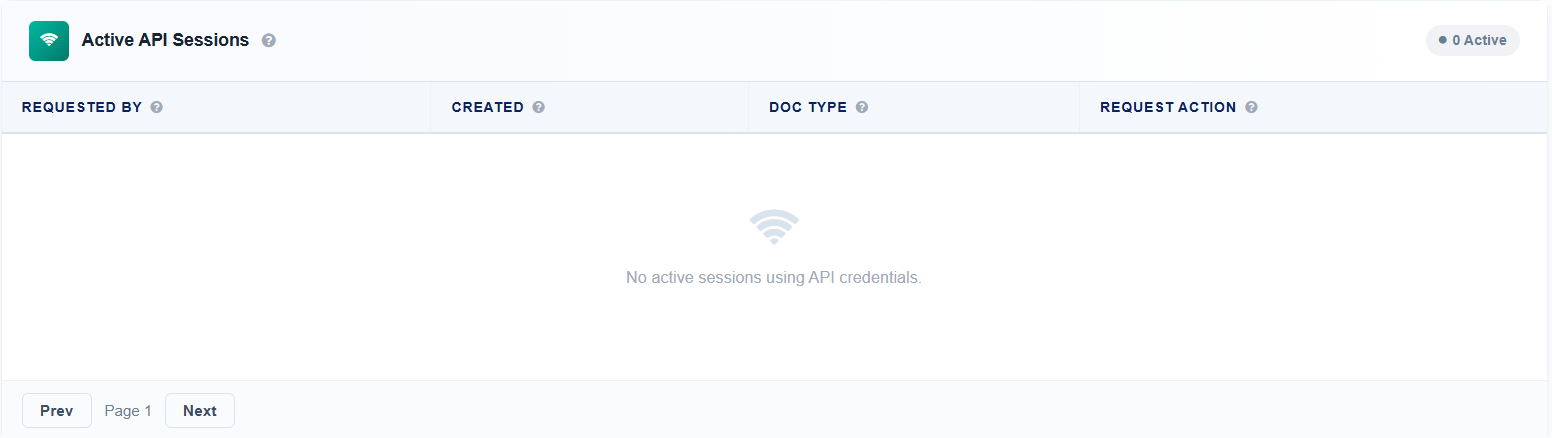
The SKYBIZ portal provides immediate access to audit log entries through the Active API Sessions panel on the API Credentials page.
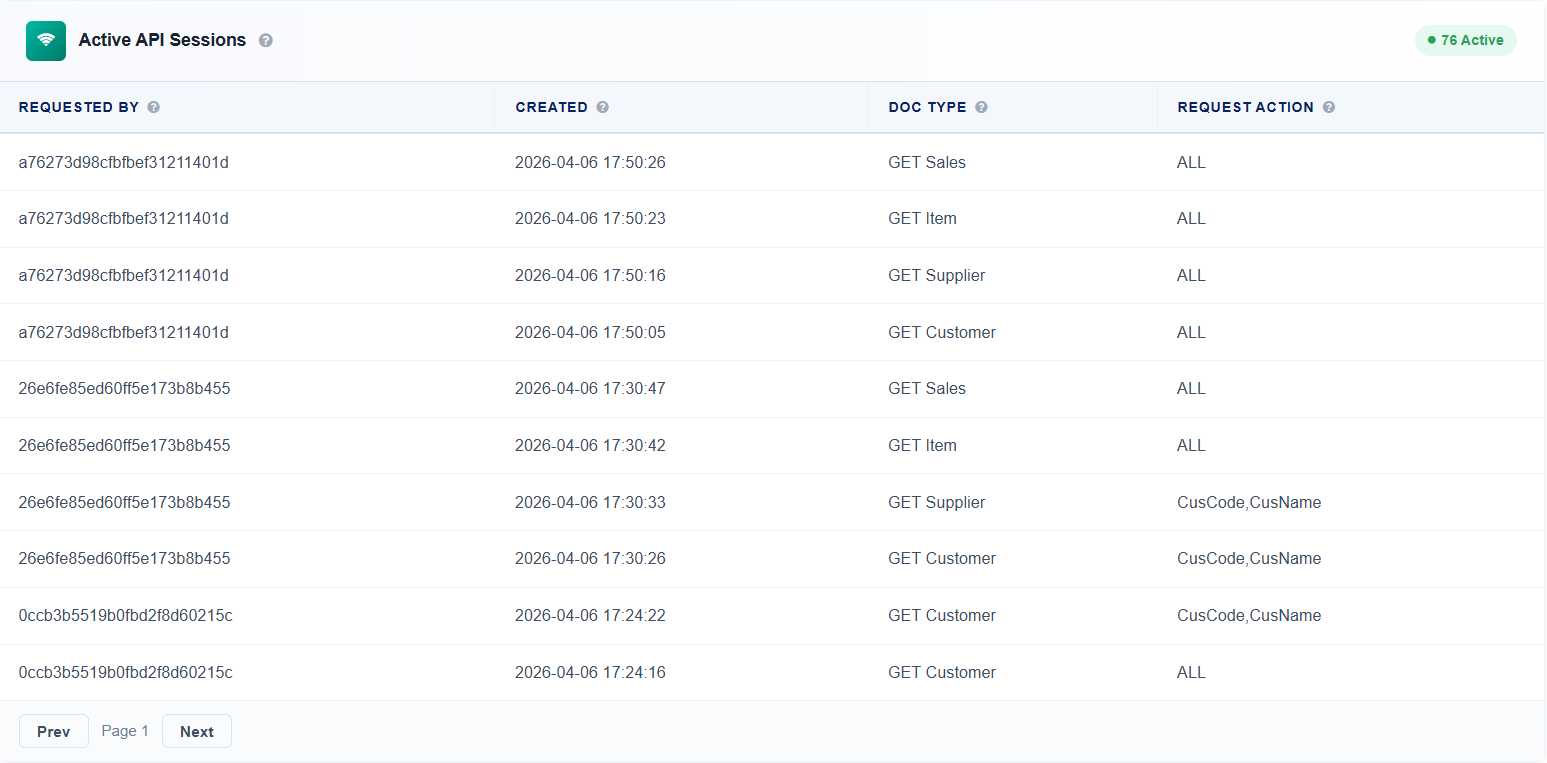
To access the audit log:
- Navigate to the API Credentials section in the SKYBIZ portal
- Scroll down to the Active API Sessions panel below the credentials table
- The panel displays a paginated table of recent API requests, showing the Requested By, Created timestamp, Doc Type, and Request Action for each entry
- Use the Prev and Next pagination controls at the bottom of the panel to navigate through the log history
The Active API Sessions badge in the panel header reflects the total number of log entries associated with your store, updating each time the panel is loaded.
Recommendations
Use the audit log to verify integration behaviour during development. During initial integration development and testing, the audit log is a reliable way to confirm that your requests are reaching the API, being authenticated correctly, and accessing the intended modules and fields. Cross-reference your expected request pattern against the log entries to identify any discrepancies early.
Treat RequestedBy as your activity attribution field. Since the RequestedBy field records the API Key for every entry, organisations running multiple credential sets against the same store can attribute activity to specific integrations directly from the log — without needing to maintain a separate activity record on their own systems.
Security & Compliance
Overview
The SKYBIZ API is built with security as a foundational requirement, not an afterthought. Every layer of the system — from credential issuance to request handling to error responses — is designed to minimise exposure of sensitive data and limit the blast radius of any potential credential misuse. This section documents the specific security properties of the API so that your organisation can accurately assess the system against your own security and compliance requirements.
Store-Scoped Credentials
Every API Key issued by the SKYBIZ system is bound to a specific store at the point of registration. A credential set can only access data belonging to the store it was registered against — it is not possible for one credential to retrieve data from a different store, regardless of how the request is constructed.
This means that even in a scenario where a credential is compromised, the scope of accessible data is strictly limited to the single store associated with that credential. There is no elevation path from a store-level credential to broader system access.
API Secret Handling
The API Secret is generated as a 64-character random string at the point of credential registration and is transmitted once — to your Callback URL — at that moment. The following properties govern how the Secret is handled within the SKYBIZ system:
- The plain-text Secret is never written to the database
- The plain-text Secret is never written to any log file
- The plain-text Secret is never returned in any API response, including the registration response itself
- What is stored is a bcrypt hash of the Secret, used exclusively for verification purposes on each incoming request
The practical implication of this design is that the SKYBIZ system has no ability to retrieve or disclose your Secret after the initial registration callback. If your Secret is lost, the only resolution is to deactivate the credential set and re-register to generate a new one. This is by design.
Error Response Sanitisation
All error responses returned by the SKYBIZ API are sanitised before being sent to the client. Internal system errors — including database error messages, query details, server file paths, stack traces, and any other diagnostic information — are never included in the API response body under any circumstance.
When a server-side error occurs, the response returned to you will contain only a generic "Internal server error" message alongside a request_id. The full diagnostic detail is written exclusively to the server-side error log, accessible only to SKYBIZ system administrators. This ensures that your requests — including any that may be intercepted in transit — cannot be used to gain intelligence about the underlying system architecture.
Per-Store Integration Control
API Integration can be enabled or disabled on a per-store basis by your SKYBIZ administrator at any time. When integration is disabled for a store, all incoming API requests associated with that store — including credential registration attempts and data retrieval calls — are rejected immediately with a 403 Forbidden response, regardless of credential validity.
This control provides a single, administrator-managed kill switch for all API activity on a store. In the event of a suspected security incident, a compliance requirement, or a planned maintenance period, disabling integration at the store level immediately halts all external API access without requiring individual credential deactivation.
Credential Deactivation and Record Retention
API Integration can be enabled or disabled on a per-store basis by your SKYBIZ administrator at any time. When integration is disabled for a store, all incoming API requests associated with that store — including credential registration attempts and data retrieval calls — are rejected immediately with a 403 Forbidden response, regardless of credential validity.
This control provides a single, administrator-managed kill switch for all API activity on a store. In the event of a suspected security incident, a compliance requirement, or a planned maintenance period, disabling integration at the store level immediately halts all external API access without requiring individual credential deactivation.
Credential Deactivation and Record Retention
When a credential set is deactivated — either through the portal or via the deactivation endpoint — the following fields are set to null on the associated record:
- API Key
- API Secret (hashed value)
- Callback URL
- Module configuration
The underlying store record itself is retained in the system. It is not deleted. This is intentional for two reasons. First, it preserves audit continuity — historical audit log entries that reference the deactivated credential remain intact and traceable. Second, it allows a new credential set to be registered for the same store by updating the existing record in place, rather than creating a duplicate entry.
Any API request submitted using a deactivated API Key will receive a 401 Unauthorised response. The deactivated key cannot be reactivated — re-registration generates a new key pair entirely.
HTTPS Enforcement
HTTPS is enforced at the application level on all SKYBIZ API endpoints. Any request arriving over plain HTTP is rejected with a 403 Forbidden response. There is no automatic redirect from HTTP to HTTPS — the connection is refused and the request is not processed.
This enforcement applies universally and without exception. Ensure that your HTTP client is configured to use HTTPS explicitly, and that your integration does not fall back to HTTP under any error or timeout condition.
Error Reference
Overview
The following table documents every error message returned by the SKYBIZ API, the HTTP status code accompanying each, the conditions that trigger it, and the recommended action your integration should take in response. Use this reference as the first point of call when diagnosing unexpected API behaviour.
Complete Error Message Reference
| HTTP Status | Error Message | Trigger Condition | Recommended Action |
|---|---|---|---|
| 400 | "API key and secret are required" |
The request body is missing api_key, api_secret, or both |
Ensure both fields are present in the JSON body of every request |
| 400 | "action is required. Use 'read' or 'create'" |
The action field is missing from the request body |
Include "action": "read" or "action": "create" in every request |
| 400 | "Invalid action. Use 'read' or 'create'" |
The action field contains a value other than "read" or "create" |
Correct the action value |
| 400 | "callback_url is required" |
A credential registration request was submitted without a callback_url |
Include a valid publicly accessible HTTPS URL in the callback_url field |
| 400 | "store_code and store_main are required" |
One or both store identifier fields are absent from the request | Verify both store_code and store_main are present and correctly populated |
| 400 | "Invalid JSON input" |
The request body could not be parsed as valid JSON | Validate your request payload with a JSON linter before resubmitting |
| 400 | "date_from and date_to are required" |
A read request was submitted without one or both date range parameters | Include both date_from and date_to in every read request |
| 400 | "Invalid date format. Use YYYY-MM-DD format." |
A date value was supplied in a format other than YYYY-MM-DD |
Reformat all date values to YYYY-MM-DD |
| 400 | "Invalid date values. Please provide valid dates." |
A date value does not correspond to a real calendar date | Check that both dates are valid calendar dates |
| 400 | "Date range cannot exceed 31 days." |
The difference between date_from and date_to is 31 or more days |
Narrow the date range to 30 days or fewer |
| 400 | "date_from cannot be after date_to." |
date_from is a later date than date_to |
Swap the date values or correct the intended range |
| 400 | "fields must be an array" |
The fields parameter was supplied but is not a valid JSON array |
Ensure fields is submitted as a JSON array of strings |
| 400 | "filters must be an array" |
The filters parameter was supplied but is not a valid JSON object |
Ensure filters is submitted as a JSON key-value object |
| 400 | "No valid fields requested" |
The fields array contained no recognised field names for the module |
Cross-reference your field names against the Module Field Reference |
| 400 | "sales_data is required for create action" |
A create request to sales.php was submitted without a sales_data field |
Add sales_data with a documents array to the request body |
| 400 | "sales_data.documents must be a non-empty array" |
sales_data was present but documents was missing, empty, or not an array |
Ensure documents is a non-empty JSON array |
| 400 | "purchase_data is required for create action" |
A create request to purchase.php was submitted without a purchase_data field |
Add purchase_data with a documents array to the request body |
| 400 | "purchase_data.documents must be a non-empty array" |
purchase_data was present but documents was missing, empty, or not an array |
Ensure documents is a non-empty JSON array |
| 400 | "Maximum 500 documents allowed. You sent X." |
The documents array contained more than 500 entries |
Split the payload into multiple requests of max 500 documents each |
| 400 | "Document X (Doc1No: Y): Missing header fields - ..." |
One or more compulsory header fields are absent from a document | Include all required header fields: Doc1No, CusCode, DocType, HCNetAmt, HCDtTax |
| 400 | "Document X (Doc1No: Y), Item Z: Missing fields - ..." |
One or more compulsory item fields are absent from a line | Include all required item fields: ItemCode, Description, Qty, FactorQty, UOM, HCUnitCost, HCLineAmt, BlankLine |
| 400 | "Invalid DocType 'X'. Allowed: ..." |
The DocType value is not in the permitted list for the module |
Use only accepted DocType values for the module being called |
| 400 | "HCLineAmt does not match Qty × HCUnitCost" |
A line’s HCLineAmt differs from Qty × HCUnitCost by more than 0.01 |
Recalculate and correct HCLineAmt |
| 400 | "HCTax does not match HCLineAmt × TaxRate1%" |
A line’s HCTax differs from HCLineAmt × TaxRate1 / 100 by more than 0.01 |
Recalculate and correct HCTax |
| 400 | "Header HCNetAmt does not match sum of HCLineAmt" |
The document’s HCNetAmt does not equal the sum of all item HCLineAmt values |
Sum all item HCLineAmt values and set HCNetAmt to that total |
| 400 | "Header HCDtTax does not match sum of HCTax" |
The document’s HCDtTax does not equal the sum of all item HCTax values |
Sum all item HCTax values and set HCDtTax to that total |
| 400 | "ItemCode 'X' does not exist" |
The ItemCode on a line does not exist in the SKYBIZ item master |
Verify the item code exists in SKYBIZ before submitting |
| 400 | "Customer Code 'X' does not exist" |
The CusCode on a Sales document does not exist as a valid customer |
Verify the customer code exists in SKYBIZ |
| 400 | "Supplier Code 'X' does not exist" |
The CusCode on a Purchase document does not exist as a valid supplier |
Verify the supplier code exists in SKYBIZ |
| 400 | "Tax Code 'X' does not exist" |
A DetailTaxCode value does not exist or does not match the module’s tax type |
Verify the tax code exists and is configured for the correct module |
| 400 | "Sales Person 'X' does not exist" |
A SalesPersonCode value does not exist in SKYBIZ |
Verify the salesperson code exists in SKYBIZ |
| 400 | "Location 'X' does not exist" |
A LocationCode value does not exist in SKYBIZ |
Verify the location code exists in SKYBIZ |
| 400 | "Department 'X' does not exist" |
A DepartmentCode value does not exist in SKYBIZ |
Verify the department code exists in SKYBIZ |
| 400 | "Project 'X' does not exist" |
A ProjectCode value does not exist in SKYBIZ |
Verify the project code exists in SKYBIZ |
| 400 | "Branch 'X' does not exist" |
A BranchCode value does not exist in SKYBIZ |
Verify the branch code exists in SKYBIZ |
| 400 | "Document already exists" |
A Doc1No already exists in SKYBIZ for the same DocType |
Use a unique Doc1No that does not already exist in SKYBIZ |
| 401 | "Invalid API credentials" |
The API Key does not exist, or the API Secret does not match the stored hash | Verify both values are correct and free of whitespace. Re-register if the issue persists. |
| 401 | "Invalid API credentials: No expiry date set. Please generate new credentials." |
The API key exists but has no APIRenewalDate configured |
Delete the credential set from the portal and register a new one |
| 401 | "API key expired on YYYY-MM-DD. Please delete the expired credentials and create a new API key set to continue using the API." |
Today’s date is past the credential’s APIRenewalDate |
Delete the expired credential set from the portal and register a new one |
| 403 | "API integration is disabled for this account" |
API Integration is set to Mode 0 (Disabled) | Contact your SKYBIZ administrator to enable API Integration |
| 403 | "HTTPS is required for Production mode" |
A request was made over plain HTTP while in Production mode | Ensure your HTTP client is explicitly configured to use HTTPS |
| 403 | "Developer mode only allows localhost origins." |
A request originated from a non-localhost origin while in Developer mode | Only call the API from localhost when using Developer mode |
| 403 | "[Module] read permission denied" |
The credential does not carry read permission for the requested module | Contact your SKYBIZ administrator to enable read permission via the portal |
| 403 | "[Module] create permission denied" |
The credential does not carry create permission for the requested module | Contact your SKYBIZ administrator to enable create permission via the portal |
| 403 | "[Module] module not found" |
The requested module does not appear in the credential’s permission configuration | Contact your SKYBIZ administrator to restore the module configuration |
| 404 | "Store not found" |
The combination of store_code and store_main does not match any record |
Verify both store identifier values exactly match your registered credentials — these values are case-sensitive |
| 405 | "Only POST method allowed" |
The request was submitted using an HTTP method other than POST | Set the HTTP method explicitly to POST |
| 429 | "Rate limit exceeded" |
Request volume has exceeded 5 requests within a 10-second window | Implement exponential backoff — wait at least 1 second before the first retry and double the interval on each subsequent attempt |
| 500 | "Internal server error" |
An unexpected error occurred on the server | Note the request_id and retry. If the error persists, contact SKYBIZ support with the request_id, endpoint, and approximate time. Do not include your API Secret in any support correspondence. |
| 500 | "Database connection failed" |
The API was unable to establish a database connection | Retry after a short interval. If the error persists, contact SKYBIZ support with the request_id. |
Notes on Error Handling
400 errors are deterministic. The same malformed request will always produce the same 400 response. Do not retry a 400 without first correcting the specific condition identified in the message field.
The date format YYYY-MM-DD is strictly enforced. The API no longer accepts YYYY/MM/DD, DD-MM-YYYY, or ISO 8601 date strings. Always use hyphens and the YYYY-MM-DD order.
date_from and date_to are required on all modules. Unlike previous versions where date range was only required for Sales, every module now requires both date fields in every request.
401 and 403 are distinct failure modes. A 401 means your credentials could not be verified. A 403 means your credentials are valid but access is being denied for a mode, policy, or permission reason. The resolution path for each is different — 401 points to credential issues, 403 points to configuration issues that require administrator involvement.
500 errors are logged server-side automatically. You do not need to report every 500 response. However, if a 500 recurs consistently on the same request across multiple attempts, it warrants a support contact with the request_id included.
The message field is your primary diagnostic tool. In all cases, the message field in the response body will contain the specific error string listed in this reference. Build your error handling logic around this field to enable precise, actionable responses to each failure condition rather than handling all non-200 responses generically.
For create requests, a "success" status does not mean all documents were inserted. Always inspect data.summary.failed and data.fail_details in every create response, even when the top-level status is "success".
Per-Store Integration Control
API Integration can be enabled or disabled on a per-store basis by your SKYBIZ administrator at any time. When integration is disabled for a store, all incoming API requests associated with that store — including credential registration attempts, read requests, and create requests — are rejected immediately with a 403 Forbidden response, regardless of credential validity.
This control provides a single, administrator-managed kill switch for all API activity on a store. In the event of a suspected security incident, a compliance requirement, or a planned maintenance period, disabling integration at the store level immediately halts all external API access without requiring individual credential deactivation.
Credential Deactivation and Record Retention
When a credential set is deactivated — either through the portal or via the deactivation endpoint — the following fields are set to null on the associated record:
- API Key
- API Secret (hashed value)
- Callback URL
- Module configuration
The underlying store record itself is retained in the system. It is not deleted. This is intentional for two reasons. First, it preserves audit continuity — historical audit log entries that reference the deactivated credential remain intact and traceable. Second, it allows a new credential set to be registered for the same store by updating the existing record in place, rather than creating a duplicate entry.
Any API request submitted using a deactivated API Key will receive a 401 Unauthorized response. The deactivated key cannot be reactivated — re-registration generates a new key pair entirely.