Introduction to SKYBIZ Proforma Invoice
A proforma invoice is a preliminary or estimated invoice sent by a seller to a buyer before the actual sale takes place. It outlines the details of a proposed transaction, including the description of goods or services, quantities, prices, terms, and expected delivery or payment conditions. Unlike a commercial invoice, a proforma invoice is not a demand for payment or a final accounting document—it is issued for informational purposes only. In accounting and international trade, proforma invoices are often used to declare the value of goods for customs, provide pricing estimates, or obtain approvals before issuing a formal sales invoice.
How to Send a Proforma Invoice to Your Customer?
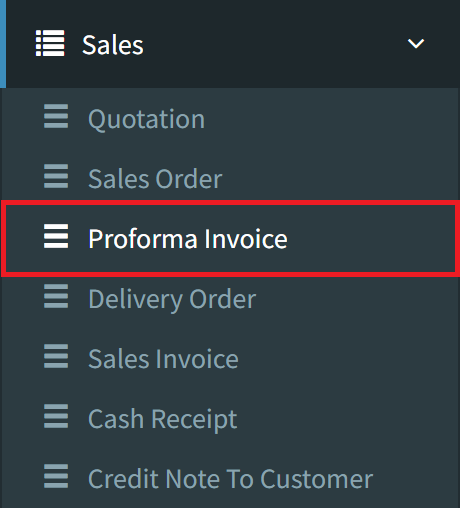
Step 1: To send a proforma invoice to your customer, navigate to Sales > Proforma Invoice
Step 2: Click the Listing button on the bottom right to view all proforma invoices

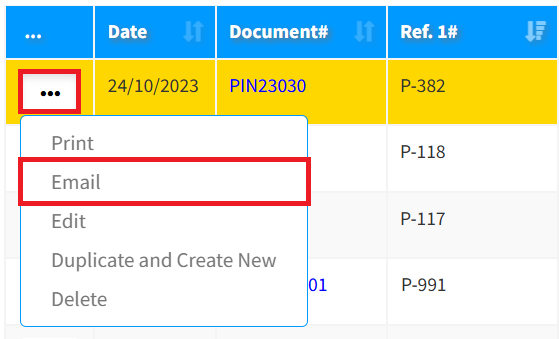
Step 3: Click the 3-Dots icon, then click Email to send the sales order to your customer
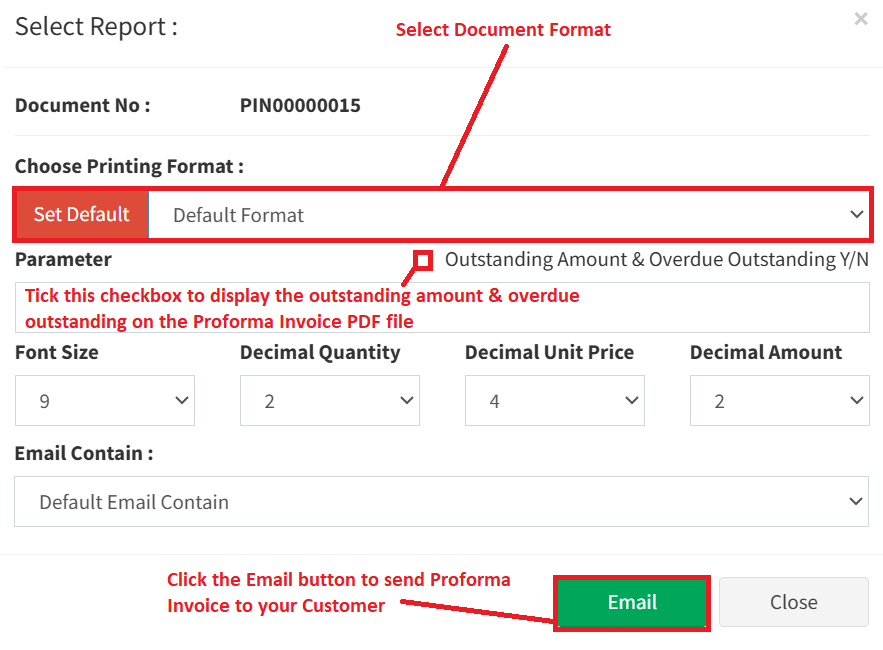
Step 4: Select the document format, then click the Email button to continue sending the proforma invoice to your customer
Conclusion
In conclusion, a proforma invoice is a valuable tool used to communicate the details of a proposed transaction before it becomes final. While it is not a binding document or a request for payment, it plays an important role in setting expectations, facilitating internal approvals, and supporting processes like budgeting and customs clearance. By providing a clear preview of the goods, pricing, and terms, the proforma invoice helps ensure transparency and smoother coordination between buyers and sellers.
Powered By: SKYBIZ ®