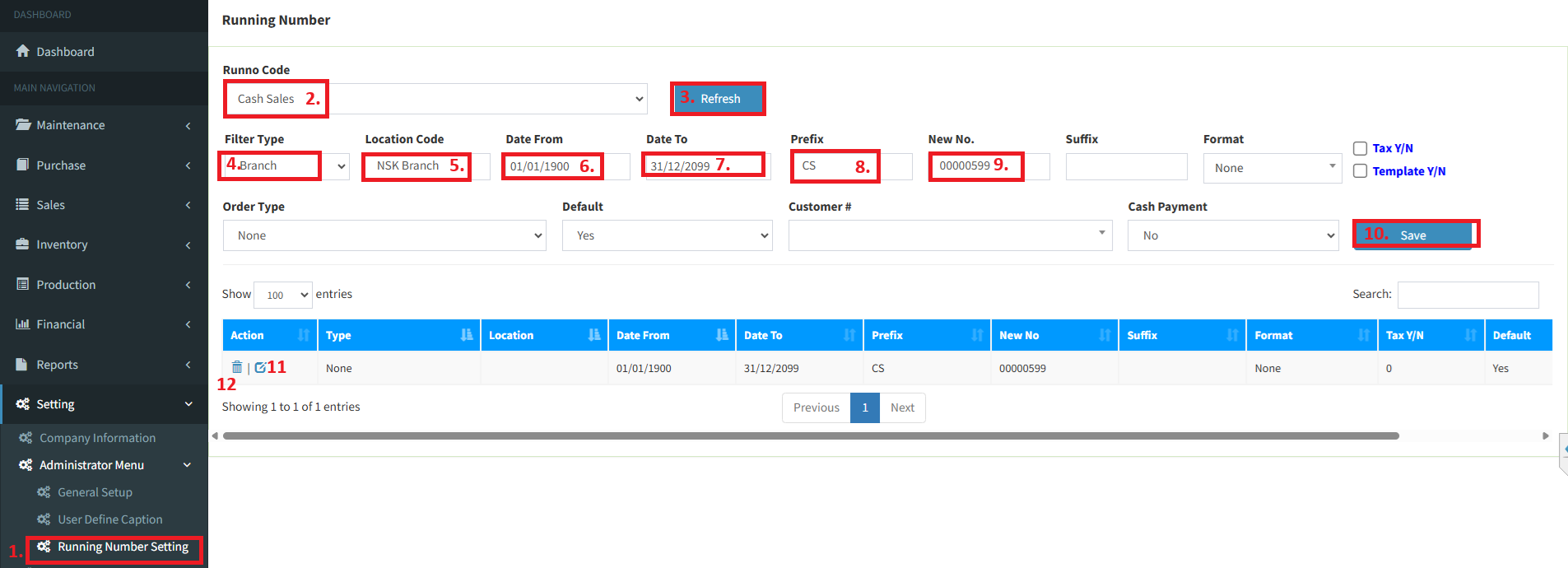
Below are guideline(s) to setting “cash sales” running number:
Click “Setting>>Administrator Menu>>Running Number Setting. 2.
3.Click “Sales Invoice” and “Refresh“
4.If your company running on “multi-branch” then you choose “Branch” else choose “None“.
5.If option 4 you choose “Branch” then fill up your “branch code” else blank the object
6.Type “Date From” Example “01/01/1900“.
7.Type “Date To” Example “31/12/2099“.
8.Type “Prefix” Example “CS“.
9.Type “Last Number” used in old system or “New preset number” Example “00000599“.
10.Click “Save” to confirm your preset running number.
11.Click an “Edit” icon to modify any preset and follow step 10.
12.Click an “Delete” icon to delete any preset.