SKYBIZ Cloud ERP Support

  • SKYBIZ Cloud ERP
  • SKYBIZ Cloud Payroll
  • SKYBIZ Offline

Create New Account Code

 2024-09-24   0201. Chart Of Account, 02. GL

During the creation of new account book, if you have selected ‘Chart of Account’,
it will be displayed and you may just modify, add, delete or edit from existing chart of account list.

Below are the steps for creating a new account code under an existing parent/ level account.


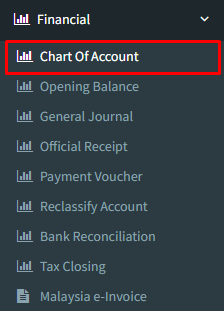
Step 1: Click on side menu >> Financial >> Chart of Account
 

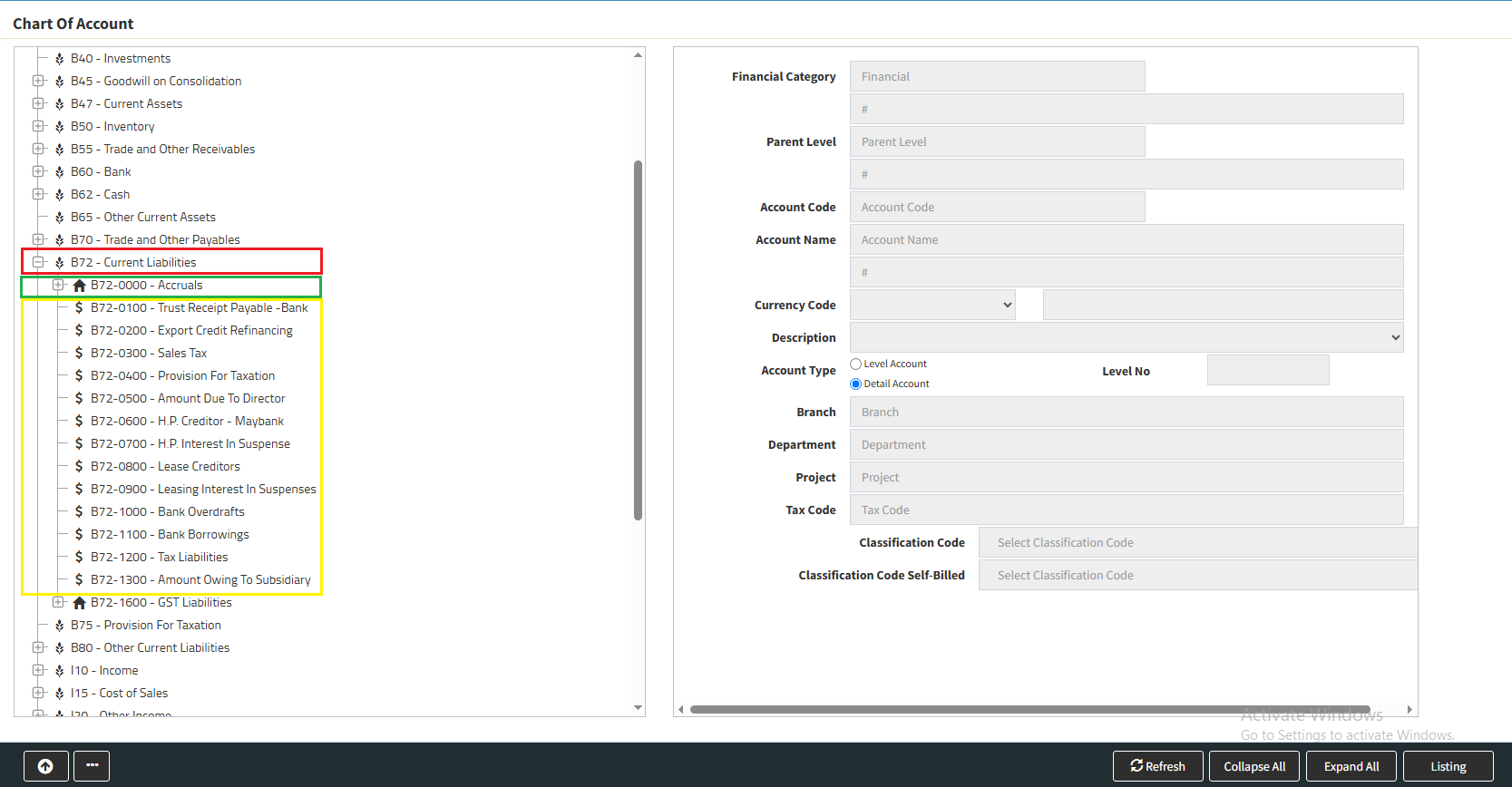
Step 2 : When click in to the Chart of Account will see the standard account code.
There are 3 types of Account code :
Bold in Red : Standard Chart of Account Code
Bold in Green : Level Account ( that is no transaction, carry sub account called : detail account )
Bold in Yellow : Detail Account
 

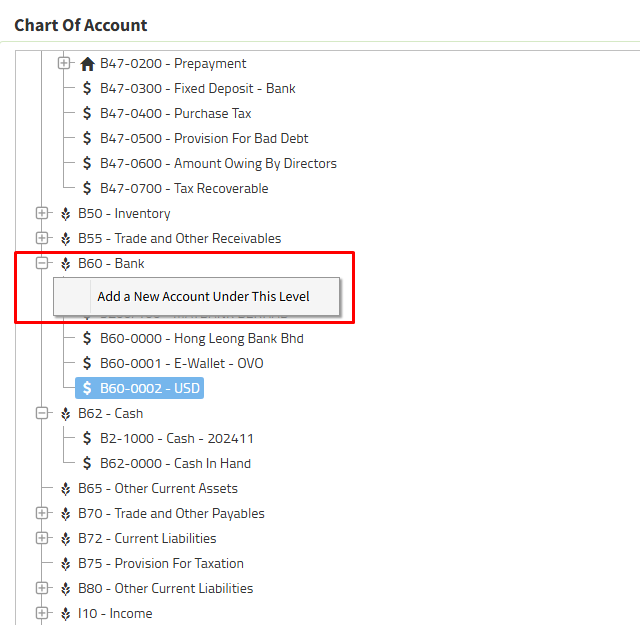
Step 3 : Right click to add a new account from either the Standard Chart of Account or Level Account 
For example we create a new “details account” for the standard chart name : bank account
Right Click on Bank and “Add a New Account Under This Level”
 

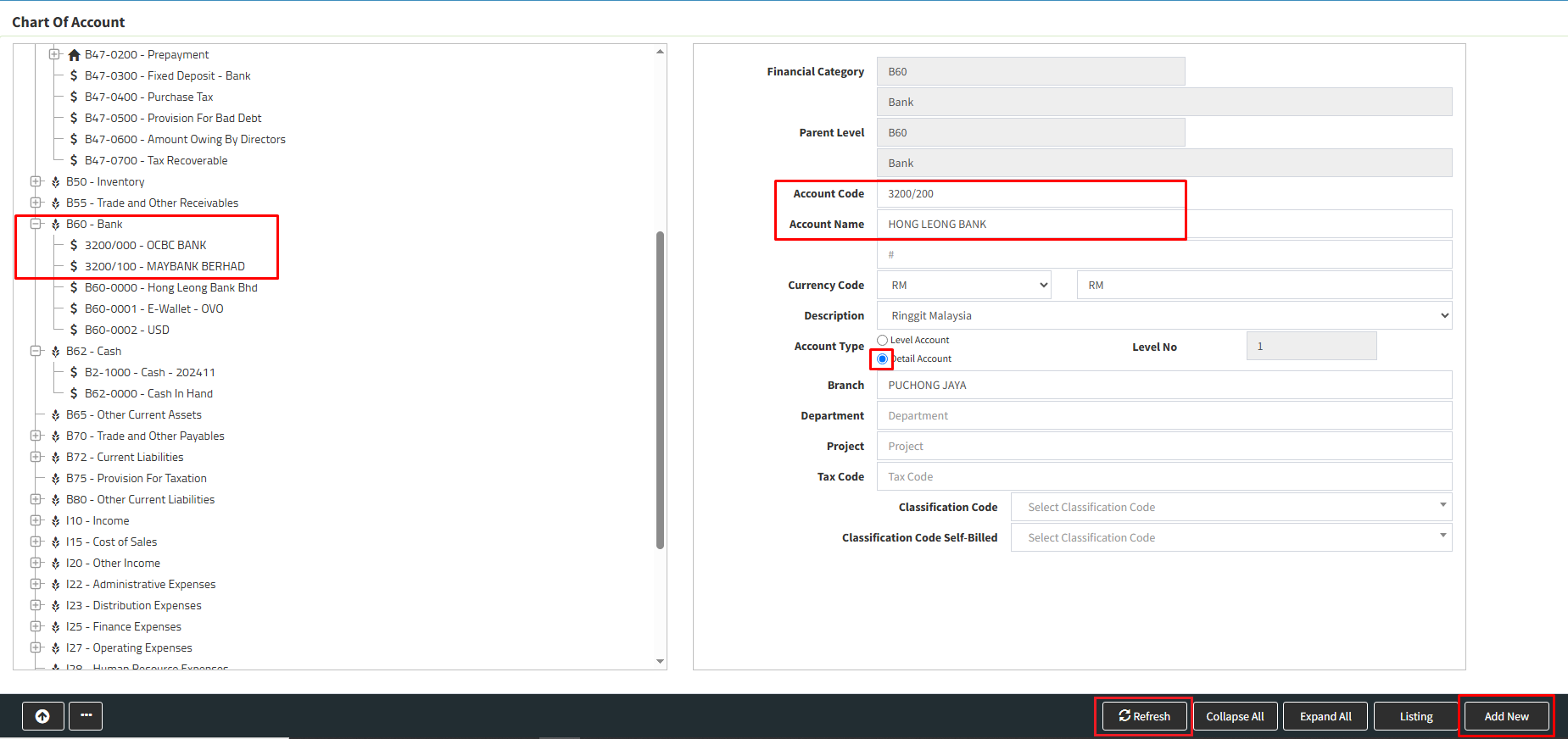
Step 4 : On right side you will see “Financial Category” and “Parent Level” are from standard chart account name : Bank
Key in your new account code ( following number from the existing bank account number ) and account name : the bank name

Step 5 : Tick your account type :  “Details Account”

 Step 6 : Click “Add New” and “Refresh” your new bank account is created under standard chart account – Bank.
 

Powered By : SKYBIZ ®

<< Payment Option Discount Setting using Pricing Matrix >>

Categories

  • Cloudbeds (1)
  • Exely (1)
  • SKYBIZ CLOUDERP (197)
    • 00. E-Invoice (14)
    • 01. Maintenance (43)
      • 0101. Item Group (3)
      • 0102. Unit Of Measurement (3)
      • 0103. Item Maintenance (3)
      • 0104. Item Bundling (3)
      • 0105. Item Bin (1)
      • 0105.Area (1)
      • 0106.Terms (1)
      • 0107.Category (1)
      • 0108.Currency Maintenance (1)
      • 0109.Sales Person (1)
      • 0110.Customer Maintenance (4)
      • 0111.Supplier Maintenance (3)
      • 0112.Price Matrix (1)
      • 0113.Branch (1)
      • 0114.Department (1)
      • 0115.Multi-Level Project (1)
      • 0116.Multi-Level Location (1)
      • 0117.Miscellaneous Maintenance (3)
      • 0123.Voucher (2)
    • CloudPOS (4)
    • 02. Purchase (2)
      • 0201.Internal Purchase Requisition (1)
      • 0202.External Purchase Requisition (1)
      • 0203.Supplier Quotation (1)
      • 0204. Purchase Order (2)
      • 0205.Goods Receive Note (1)
      • 0206.Invoice From Supplier (1)
    • 03. Sales (51)
      • 0301. Quotation (9)
      • 0302. Sales Order (11)
      • 0304. Proforma Invoice (10)
      • 0305. Delivery Order (9)
      • 0307. Sales Invoice (8)
      • 0308. Cash Receipt (2)
      • 0309. Credit Note To Customer (2)
      • 0311. Collection (1)
    • 04. Inventory (9)
      • 0405.Transfer Stock – OUT (2)
      • 0406.Transfer Stock – IN (2)
      • 0407. Stock Adjustment (2)
      • Opening Stock (1)
    • 06. Financial (15)
      • 0502.General Journal (1)
      • 0605. Payment Voucher (2)
    • 07. Reports (16)
      • 0701. Print Barcode (2)
      • 0702. Sales Report (5)
      • 0703. Point Of Sales (4)
      • 0705. Purchases (2)
      • 0706. Inventory (4)
      • 0606.General Ledger (1)
        • 0606.General Ledger (1)
      • 0609. Account Receivable Report (2)
    • 08. Setting (47)
      • 0801. Company Information (2)
      • 0802. Administrator Menu (18)
      • 0803. Security Manager (10)
      • 0804. Database Manager (5)
    • 09. Analyzer (2)
      • 0902. Multi-Dimensional Analysis (2)
    • SkyBiz Cloud (17)
  • 10. Frequent Q&A (4)
  • 02. GL (7)
    • 0204. Journal Entry (1)
    • 0201. Chart Of Account (2)
    • 0206. Bank Reconciliation (4)
  • 03. Account Receivable (4)
    • 0314. Customer Statement (1)
    • 0301. Create New Invoice (1)
    • 0301. Official Receipt – Collection From Customer (2)
  • KIV (8)
  • Cloud@Backend (10)
  • Android T series (16)
  • Android V series (10)
  • Email (2)
  • General (3)
  • MySQL (4)
  • Android WMS01 Series (7)
  • Installation (27)
  • Distribution (128)
  • Financial (122)
  • POS Retail (19)
  • SkyBiz Payroll (1)
  • Website (2)

.

  • SKYBIZ Cloud ERP
  • SKYBIZ Cloud Payroll
  • SKYBIZ Offline

SkyBiz Product(s)

  • SkyBiz E-Leave|E-Claim|E-Payyroll|E-HR Management|Online Payments for Salary, EPF, SOCSO, LHDN

.

  • SkyBiz Cloud Point Of Sales| Android Point Of Sales |Mobile Point Of Sales

Powered by MyWiki WordPress Theme