Below are guideline(s) to setting “sales invoice” running number:
- Click “Setting>>Administrator Menu>>Running Number Setting.
-
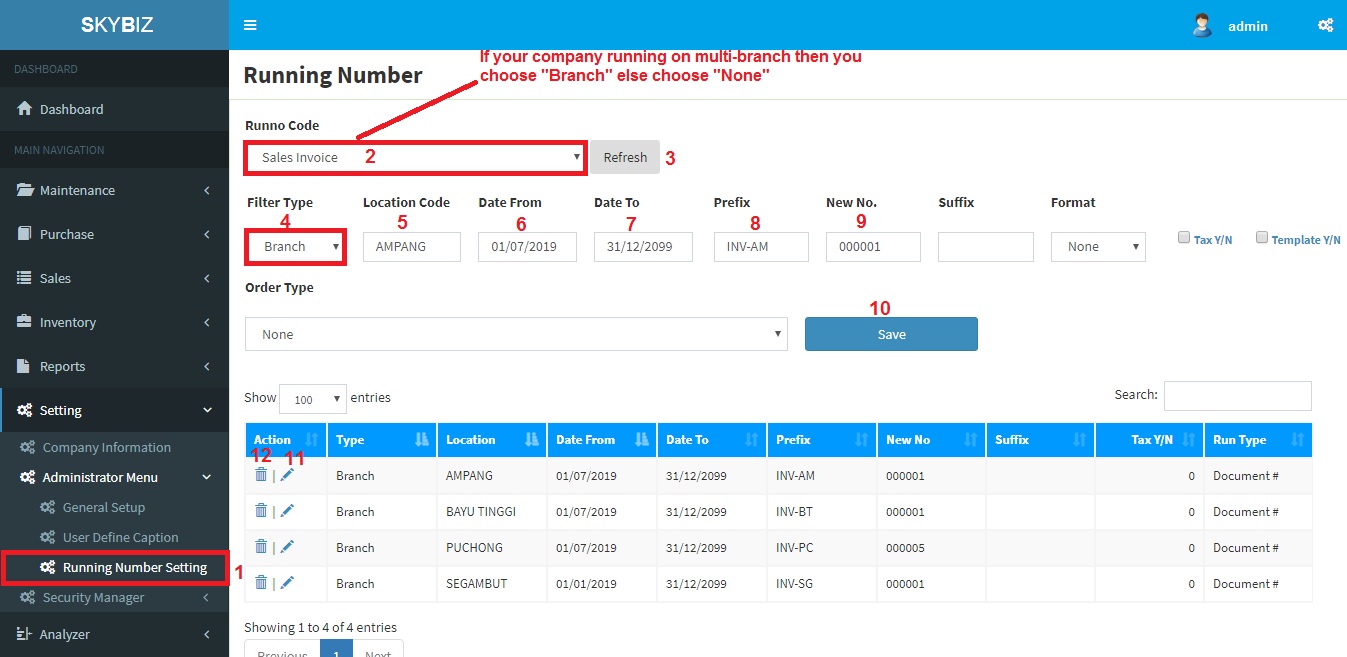
Running Number Setting
- Click “Sales Invoice” and “Refresh“
- If your company running on “multi-branch” then you choose “Branch” else choose “None“.
- If option 4 you choose “Branch” then fill up your “branch code” else blank the object.
- Type “Date From” Example “01/01/2019“.
- Type “Date To” Example “31/12/2099“.
- Type “Prefix” Example “INV“.
- Type “Last Number” used in old system or “New preset number” Example “000001“.
- Click “Save” to confirm your preset running number.
- Click an “Edit” icon to modify any preset and follow step 10.
- Click an “Delete” icon to delete any preset.
Powered By : SKYBIZ ® Beyond Cloud ™